

Central Dispatch Head of Business, Lainey Sibble, joins other experts to discuss the current state and future of fraud prevention in the automotive logistics industry, including vehicle custody and identity verification.
This edition of Central Dispatch Highlights includes the warning signs of phishing scams and a new enhancement to the carrier mobile app.
Carriers: Find Loads in the Central Dispatch Carrier App
With our latest enhancement to the carrier app, you can search, browse, and filter the load board right from your phone! Learn all about the app and this update in our blog post.
Shippers: See How One Dealer Is Saving Time and Money with Central Dispatch
Tahir Ilyas is using Central Dispatch to save countless hours and hundreds of dollars per car! Watch his story to see how he’s taking advantage of all the tools and services that Central Dispatch has to offer.
Stay Protected from Phishing Scams
Phishing scams in the auto logistics industry are on the rise, and it’s our role as THE logistics marketplace to make sure you know what to look out for. By staying aware and vigilant at every step, you can keep your business safe from dispatch to delivery!
Phishing scams in the auto logistics industry are becoming more common and more sophisticated. But understanding the warning signs, how to defend against them, and where to report scams significantly reduces your risk, and creates a safer marketplace for everyone.
Know the Warning Signs
The most common phishing scam is credential harvesting. Bad actors will impersonate Central Dispatch or another legitimate company via an email or text, then direct you to a fake website designed to steal your login credentials, payment details, or US DOT information. Watch out for these warning signs, so you can identify attacks before they start.
Unusual Sender Email: Phishing emails will always come from lengthy, complex, or otherwise strange-looking email addresses. All legitimate emails from us will come from:
- reply@messages.centraldispatch.com
- do-not-reply@centraldispatch.com
- An official @centraldispatch.com or @coxautoinc.com domain.
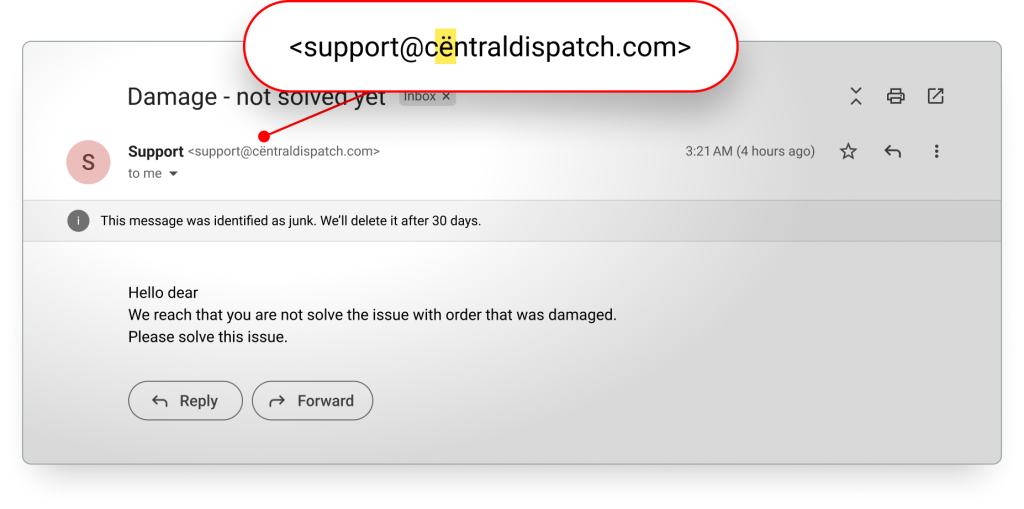
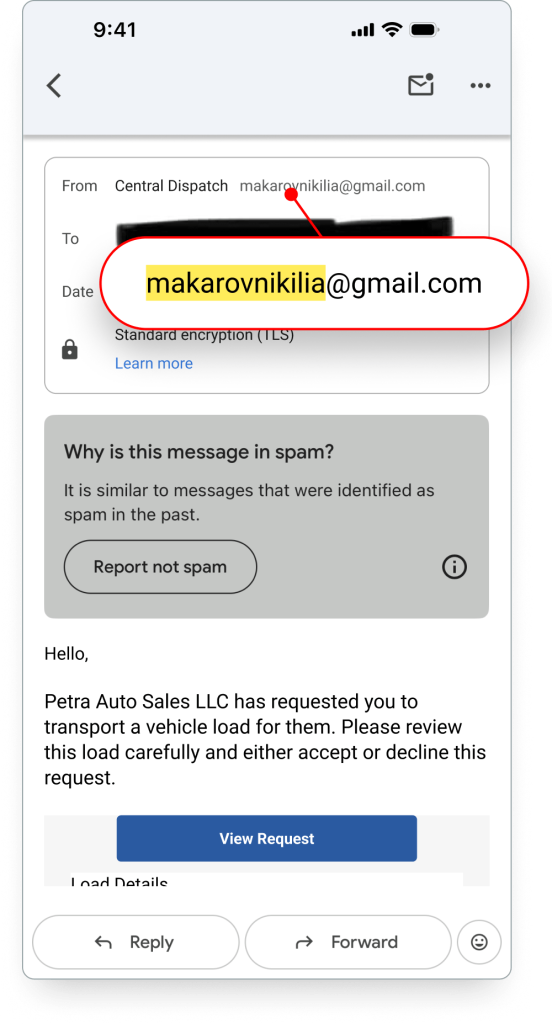
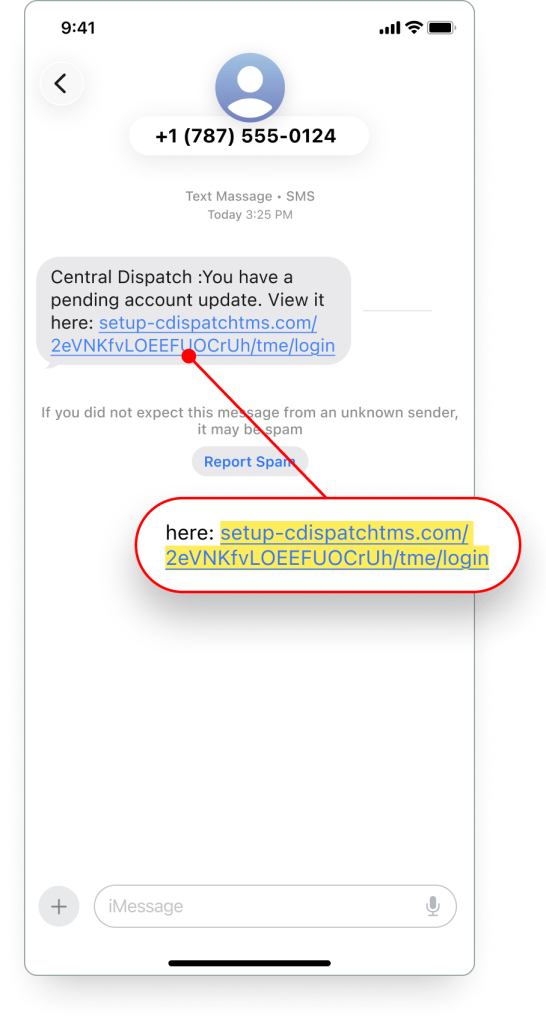
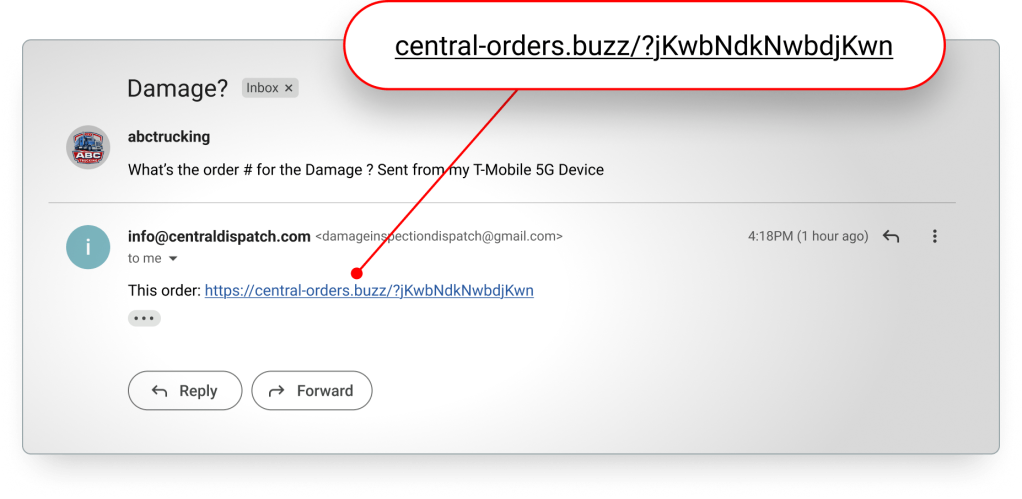
Lookalike Domains: Though scammers can create fake websites that look nearly identical to the official Central Dispatch site or login portal, they always use domains with noticeable character changes, like cëntraldispatch.com.
These fake links can appear in emails or text messages and often look convincing at first glance—but the URL itself will not match Central Dispatch’s official domains.
Legitimate URLs will always contain centraldispatch.com with no special characters or alterations, such as:
- www.centraldispatch.com
- app.centraldispatch.com
- id.centraldispatch.com
Some scammers may leverage legitimate URLs to appear more credible.
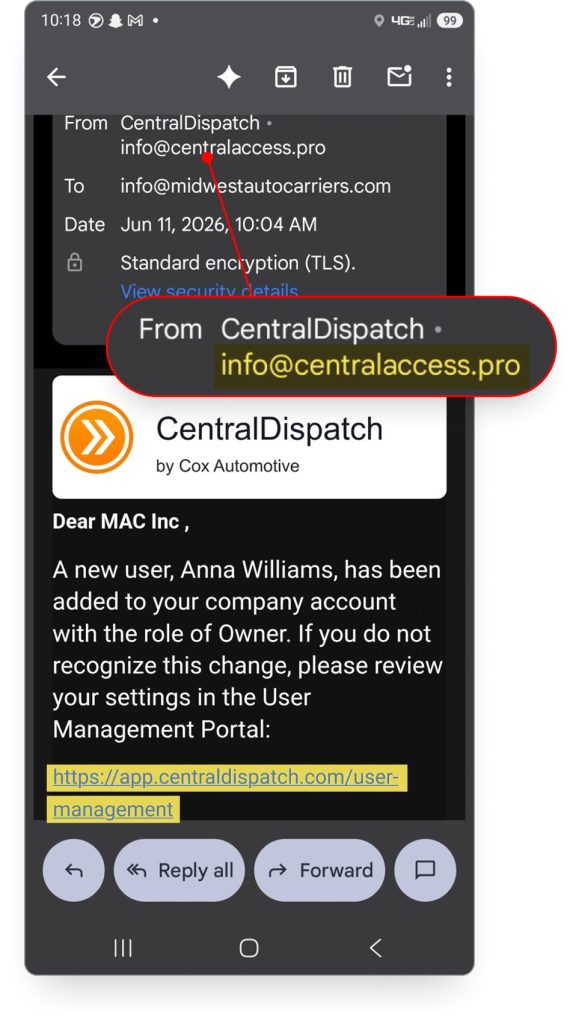
Urgent or Threatening Language: Phishing scams typically use intense language in order to get you to act fast without thinking. Be wary of any messages with sentences like: “Act now or your account will be locked” or “Your service will be discontinued.”
How to Protect Yourself
Use Extreme Caution: We will never ask for passwords, payment details, ACH, or US DOT information through an email or text. Any message requesting you to take actions involving your sensitive information are very likely phishing scams.
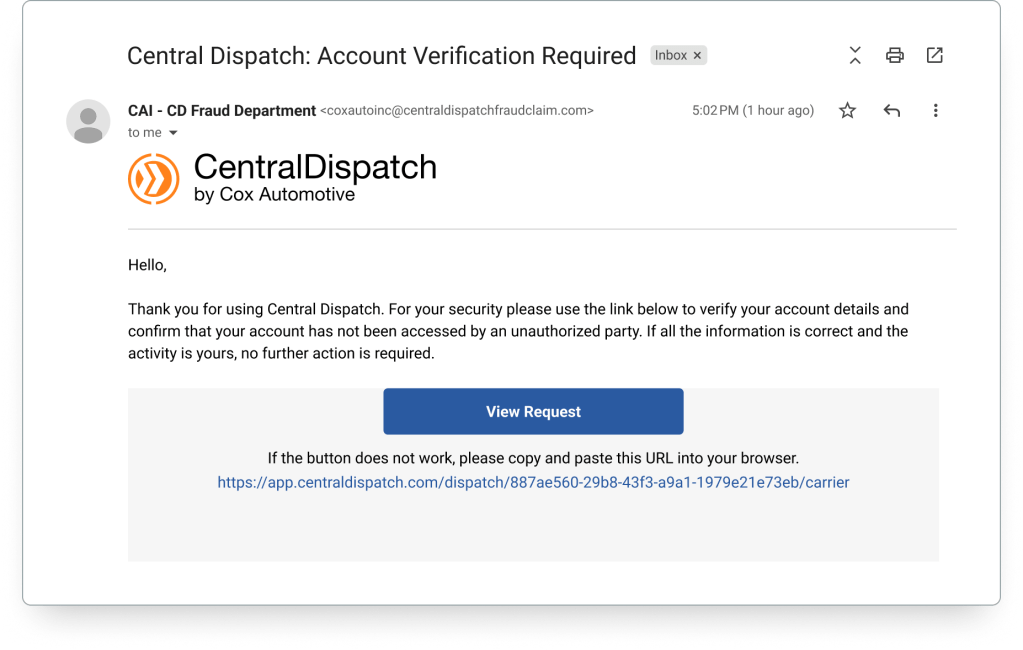
Verify Sender Email & URLs: Closely examine messages before clicking any links or downloading attachments. Hover over the sender’s display email name to reveal the true address and see if it looks unusual. Be sure to double check all domains and URLs for extra letters, special characters, or alterations.
If you have doubts, type “centraldispatch.com” directly into your browser and confirm the requests. This ensures you’ll reach our legitimate web page.
Secure Your Account: To add an extra layer of security to your account, set up User Management. This gives each user in your organization their own set of log in credentials, and lets you control their access to sensitive information—dramatically reducing the risk and impact of stolen credentials. You should never share your Central Dispatch log in credentials with anyone.
Report Suspicious Activity: If you receive a suspicious message, report it to our Marketplace Integrity Team. It helps us track scam patterns, investigate cases, and provide you with more personalized security guidance.
Contact the Marketplace Integrity Team at CentralDispatchFraudClaims@coxautoinc.com or by phone at 800‑928‑7869.
Security isn’t just a technology challenge—it’s a shared responsibility between platforms and the people who use them. So while your awareness remains your strongest defense, we’re continually working behind the scenes to root out bad actors, and create new tools to help you stay safe.
Welcome to Central Dispatch! We’re excited for you to start finding loads with us. Read this start guide to make sure you have your account set up properly, and you’re ready to take full advantage of everything our platform offers.




 1. Set Up Account
Confirm your company profile
We automatically populate your company profile based on the details you provided at sign up. Be sure to confirm all your info is correct by clicking your name in the top right of the screen, then clicking “Company Profile” from the dropdown menu. You can also add your business contacts and edit their roles (Owner, Billing, Listing, Dispatch), edit your account preferences, manage your preferred and blocked shipper list, and more.
For more details on setting up your profile, see our user guide >
Set up User Management
User Management gives each employee or contractor in your organization their own Central Dispatch log in — greatly reducing the risk of identity fraud and unauthorized access. It also allows you to assign each team member a role, giving you control over who can access certain features, and who can view certain business information.
Getting started is easy. Just click your name from any page on Central Dispatch and select “Manage Users” from the account dropdown. From this screen, you can add new users, assign their role, or edit any current user.
Adding a new user automatically sends an invitation to the email address you enter for them. Members of your team need to accept the invite before becoming active users.
Get an in-depth look at User Management in this step-by-step video tutorial >
Access and set up billing
To set up your payment methods and billing, click your name at the top right of the screen, then click “Billing” from the dropdown menu. Here you can add or edit your preferred credit or debit cards, pay invoices, view your billing history, toggle on automatic payments, and upgrade or change your subscription.
For more on billing set-up and payment, read our user guide >
Manage your subscription
To view or change your subscription, go to the “Your Subscription” area in the “Billing” page, then Click “Manage Subscriptions.”
There you’ll see all the details of your current plan, and add-on options like Price Check Plus and notifications. You can easily make changes in just a few clicks by selecting a new plan or add-on and hitting “Update Subscription.”
2. Searching & Managing Loads
Search for loads
With your profile, users, and billing set up, you’re ready to start searching for loads! From the Account Dashboard, click “Find Shipments,” and click “Search Vehicles” in the drop down menu.
Next, enter your preferred region of origin and delivery destination. To narrow your search even further, scroll down the page where you can filter by vehicle type, trailer type, number of vehicles, or minimum payment.
Toggle on the “Search Along Route” button to see vehicles that will be ready for pickup in the timeframe your truck is traveling through the area. Search results will show you the origin and destination, type of vehicle, price offered (including per mile), and the shipper’s company info.
Use our “Price Check” tool to bring up a table containing recent loads similar to yours and their listed price, helping you secure a fair, competitive rate. Or upgrade to access “Price Check Plus” for even more listing insights, and AI-powered pricing recommendations.
You can also sign up for our Saved Search Notifications, which sends you alerts when loads matching your preferences have been posted to the marketplace, so you never miss a load.
Once you find a load that interests you, make sure to review the shipper’s Central Dispatch profile and ratings before doing business with them. On their profile, you’ll see the shipper’s overall rating, as well as ratings for different categories like Timeliness, Communication, and Documentation. If you’re confident in a shipper’s profile, give them a call and accept the job.
For more on searching loads, watch this step-by-step video tutorial >
Managing your loads
Once you’ve accepted a job, the shipper will dispatch the load to you electronically, giving you all the information you need to pick up the vehicle and get started. No paperwork required!
Just navigate to “Find Shipments,” then “Dispatches” and view the dispatch details. The “Dispatches” page is also where you’ll keep track of all your loads on Central Dispatch. Whether they’re currently being dispatched, have been delivered, picked up, or were canceled.
All these important records are automatically updated, and can be accessed anytime, anywhere there’s an internet connection.
For more on managing loads, view our user guide >
Download the Central Dispatch App
We highly recommend downloading the Central Dispatch carrier mobile app, where you can complete vehicle inspections, send eBOL documentation, and share real-time delivery status updates with shippers on every load.
For more on the app, view the demo video >

3. Rate Shippers
Once a job is complete, use the Transactional Ratings system to rate and review your partners. This system allows you to give each transaction an overall rating, plus ratings in three distinct categories: Timeliness, Communication, and Documentation.
We recommend leaving a written review to give more details on your experience working with them. You can also choose when your review is published, giving you the confidence to share your full experience and provide honest feedback.
Be as fair and thorough as possible when describing your carrier partner’s performance, so other shippers can make better, more informed partnering decisions.
For more on Transactional Ratings, watch the demo video >

4. Additional Resources
Want to fully maximize your Central Dispatch subscription? Be sure to check out our Resource Center, where we’re always adding new content like in-depth video tutorials, thought leadership, and new feature announcements. It’s the best way to keep up to date with the platform, and ensure you’re using every tool to your advantage!
Ready to search for your first load? Get started! >
Download the app today!

|

|
Digital tech has brought so many changes to automotive transportation. So why manage loads the same old way? The Central Dispatch carrier app puts some of the most critical platform features right at your fingertips, helping you work with more speed and ease, from anywhere you need to.
NEW: Find Loads On-the-Go
You don’t need to be at the office to keep your trucks full and moving. The mobile app brings all your favorite load board features into a simplified mobile interface, so you can find, apply for, and secure profitable shipments from anywhere.
Search for loads with a specific origin and destination, look along your preferred routes, and enjoy all the same filters available in your desktop workflow. Learn more about searching for loads in the app here.
Instant Delivery Updates
Forget the back-and-forth phone calls. The carrier app’s Real-Time Tracking feature lets you send live delivery and status updates straight to a shipper’s desktop or mobile phone!
Just enable Real-Time Tracking in the app’s “Settings” menu, and shippers will see the exact location of their vehicle on an interactive GPS map, and receive automatic pickup and drop-off updates. There’s no better way to give customers more transparency and peace-of-mind.
Faster Inspections
Vehicle inspections are one of the most critical parts of any logistics operation, and now they can be the smoothest, most efficient part too! The carrier app lets drivers complete the entire inspection process from start to finish, right from the convenience of their phone.
Simply take photos, mark damages, write notes, and collect signatures — all in one smooth and intuitive process. Whether picking up or dropping off, your drivers will be able to quickly get vehicles verified and get back on the road.
Shippers can even request that inspections be completed on the app directly from the dispatch experience in order to streamline the process for everyone.
Easier EBOL Sharing
Stay flexible on the road. With dynamic EBOL viewing and sharing available right in the app, you can keep shipments running smoothly from anywhere. All you need is the shipper’s email address, and you’re ready to seamlessly send over documents and shipment updates for stronger, easier connections with customers.
Add Expenses
The mobile app lets you add incremental expenses for greater transparency with shippers, and easier bookkeeping on-the-go. Just add a new charge, fill out all the details, and the invoice will be updated automatically.
Manage Loads from Anywhere
With inspections, load search, tracking, and document sharing all in your pocket, the Central Dispatch carrier app helps carriers stay efficient and connected on the go. Start managing your loads with more speed and simplicity today — download and try out the app!
Want to learn more about the Central Dispatch carrier app? Watch the demo video >
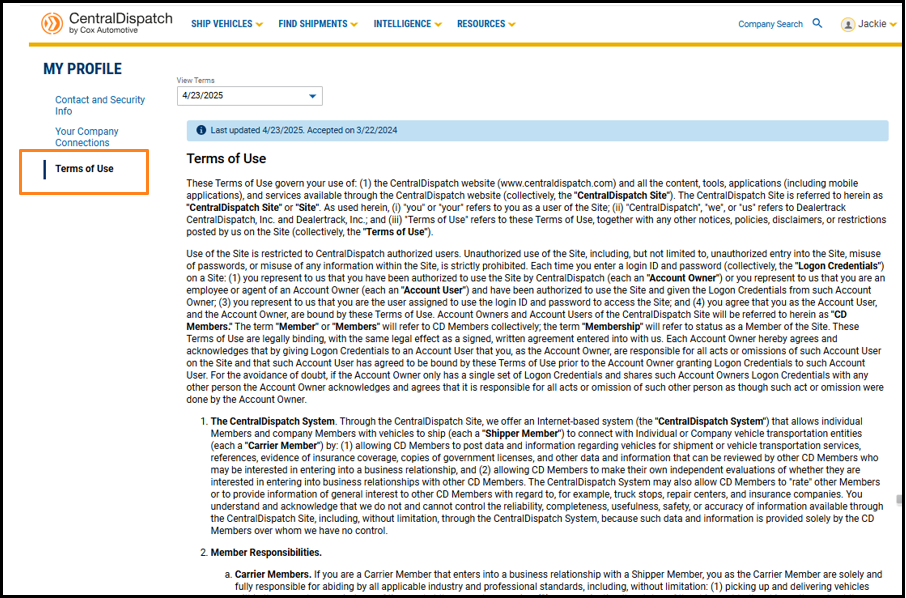
An overview of the My Profile page, including how to edit your contact information, manage verification steps, view company relationships, and access terms of use.
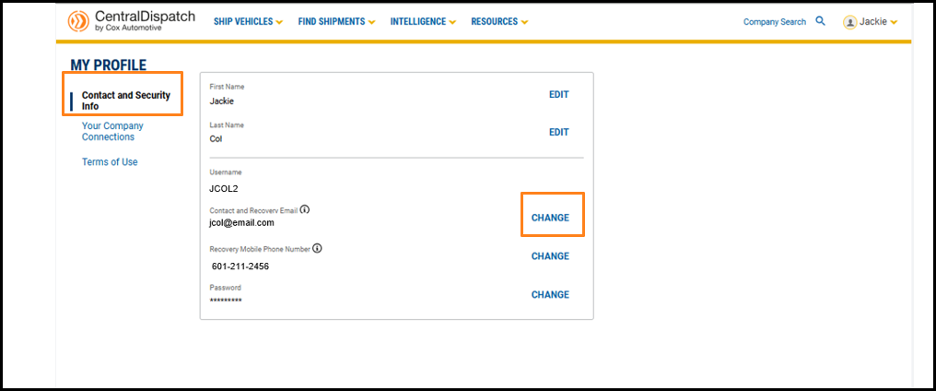
Every User has their own My Profile page:
- Contact and Security Info contains your username and password to log into your account
- Your Company Connections displays the different companies you are associated with on Central Dispatch
- Terms of Use includes the date you accepted the terms
To view your My Profile page, click on your username and My Profile from the drop-down menu.
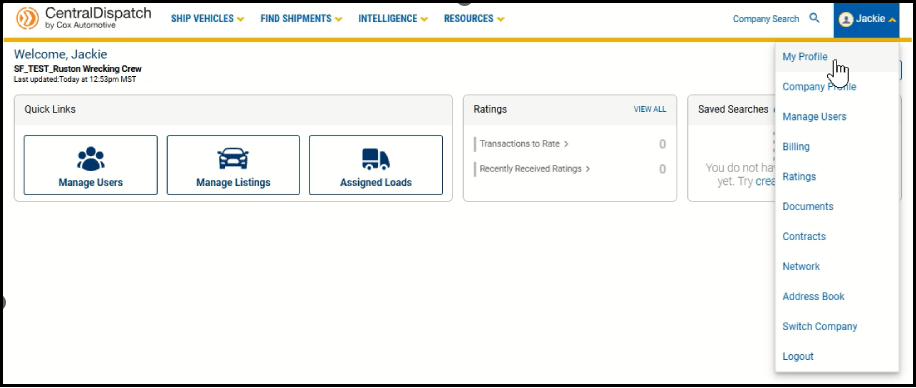
From the Contact and Security Info tab, click EDIT or CHANGE to update profile information.
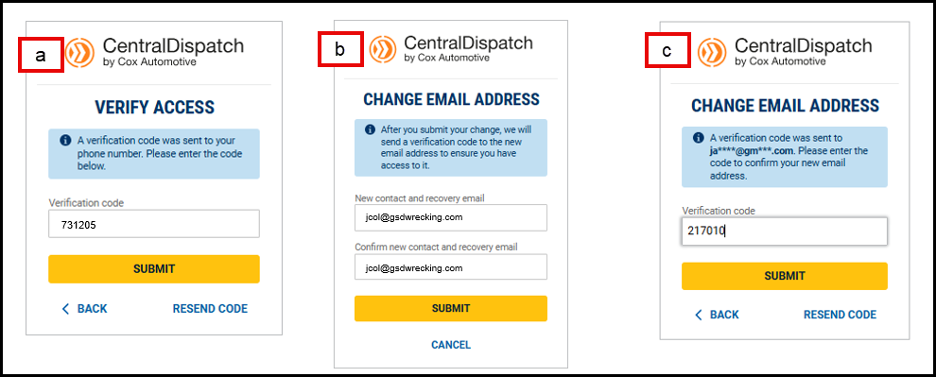
- Making any changes to your My Profile requires verification for the security of your account
- Enter the verification code sent
- Enter your new contact and recovery email (or phone number)
- A verification code will be sent to the added email or phone number to confirm you have access
- Enter code and submit
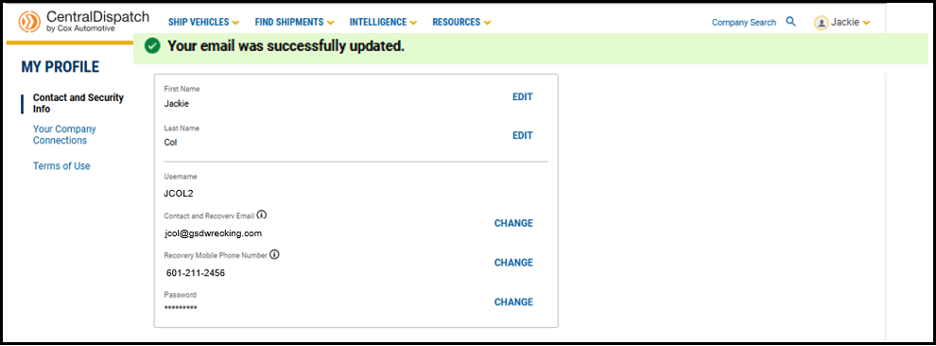
Result: A message will appear displaying the update was successful
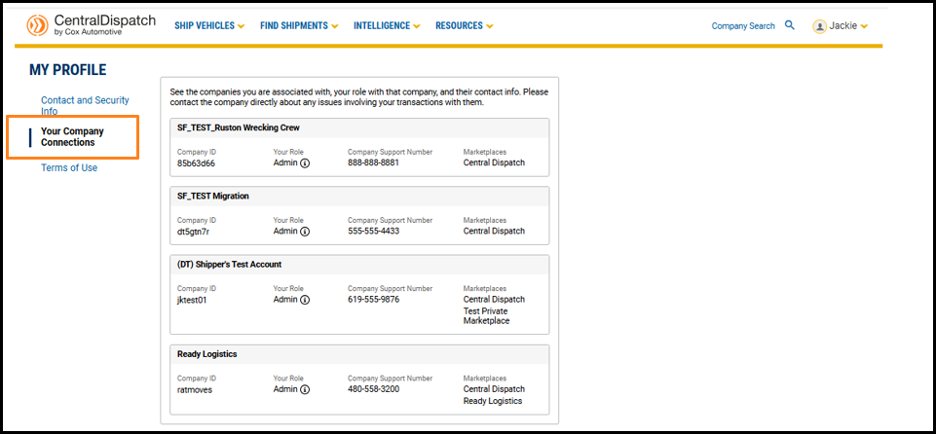
If you are a member of multiple companies, the Your Company Connections tab displays all the companies you are associated with, along with your role.
- The Company Support Number is available, and users are encouraged to reach out to the company directly for help with issues regarding their account or transactions
Terms of Use allows you to view the terms of use and the last time they were updated.
Customize your Central Dispatch Dashboard to show widgets that are most relevant to your business. Showcase what’s most important to you, while hiding anything you don’t need to see in order to save time and streamline your view.
To get started, click the Customize button on your dashboard.
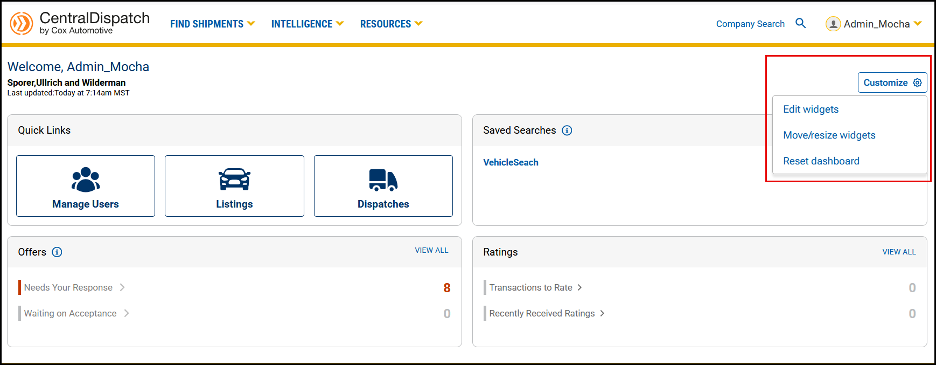
Edit widgets opens a slide out form, allowing users to select which widgets they want to appear on their dashboard. After selecting widgets, click Confirm.

Move/resize widgets allow you to drag and drop the widgets to any position on the dashboard.
- Widgets will automatically resize based on their position on the page
- Click Done to lock the widgets in place
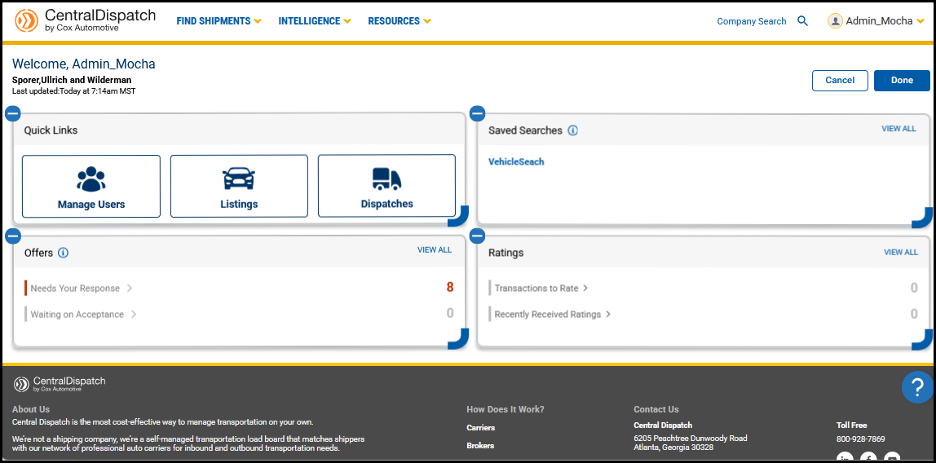
Reset dashboard returns the widgets to their original position.
Premium and Price Check Plus customers will soon have access to an estimated time to dispatch in the Central Dispatch Price Check Plus tool. Estimated time to dispatch will automatically be shown along with each pricing recommendation, allowing shippers to have clearer timing expectations and help determine how to price a load. This enhancement also helps carriers reduce idle time, and helps everyone on our platform forge stronger relationships with partners.
Learn more about the estimated time to dispatch in our latest article and user guide. Learn more about our Premium and Price Check Plus add-ons on our plans page.
This edition of Central Dispatch Highlights focuses on our upcoming Price Check Plus time to dispatch and ID verification enhancements.
View Estimated Time to Dispatch with Price Check Plus
Premium and Price Check Plus customers will soon be able to see an estimated time to dispatch for each pricing recommendation. This will help shippers determine where to price a load based on their scheduling needs, and allow carriers to reduce idle time.
Help Keep the Marketplace Safe with ID Verification
All customers will soon be required to complete ID verification in order to utilize Central Dispatch. ID verification will help us enhance security, reduce fraud, and foster more trust across the marketplace.
