

Manage Your Network with Confidence
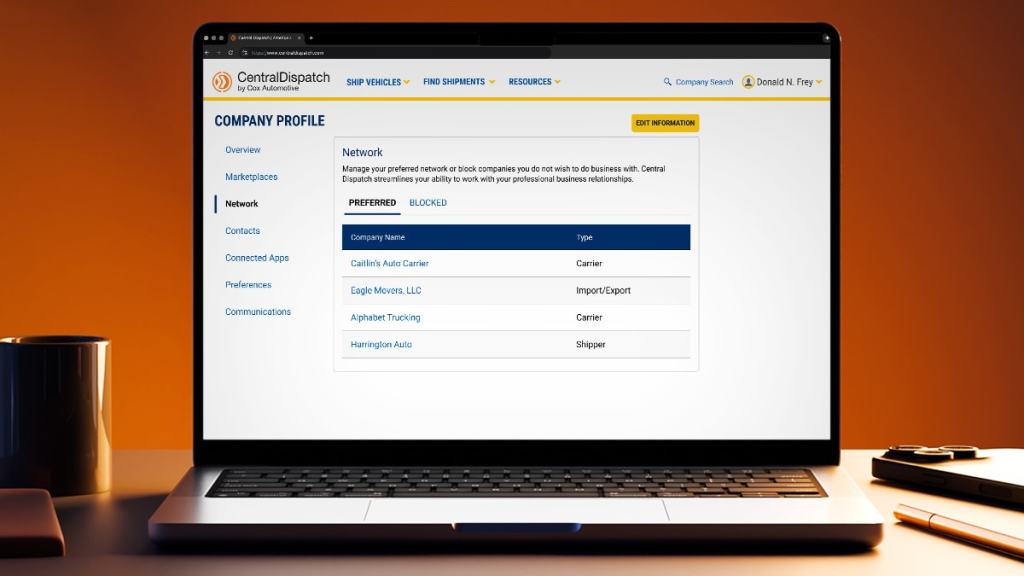
Manage your Preferred and Blocked companies to shape who you see—and who sees you—on Central Dispatch.
In the fast-moving world of automotive logistics, trust and efficiency are critical. Whether you’re managing a high volume of dispatches or building long-term relationships with reliable partners, having control over your network helps you reduce risk, save time, and operate with confidence.
Central Dispatch’s Preferred and Blocked functionality allows you to manage your professional relationships directly in-platform—promoting visibility for trusted partners and avoiding those you no longer wish to work with.
Preferred Carriers: Streamline Your Workflow
Adding companies to your Preferred network makes it easier to work with trusted partners. Preferred status improves visibility and simplifies selection across key workflows:
- Carriers can filter listings to show only Preferred shippers when searching for vehicles.
- Shippers will see Preferred carriers at the top of the list when creating a dispatch or assigning a load.
- Both can view and manage Preferred status directly from the Network tab of the Company Profile page.
Blocked Partners: Visibility Matters
Blocking a company removes visibility across key workflows—for both sides. Whether you’re a shipper or a carrier, this feature helps you maintain control and protect your business from unwanted interactions.
- Carriers will not see listings from shippers they have blocked or shippers who have blocked them.
- Shippers will not see carriers they have blocked or carriers who have blocked them.
- Both can view and manage Blocked status directly from the Network tab of the Company Profile page.
This mutual visibility removal ensures your network stays focused on trusted relationships—helping you avoid surprises and operate with confidence.
Tips to Get the Most Out of Your Network
- Actively manage your network: Regularly review and update your Preferred and Blocked companies based on recent experiences.
- Use filters wisely: When searching for loads use the ‘Shippers Preferences’ filter to streamline your workflow.
- Ensure proper access: Only users with Owner or Admin and Member Manager roles can manage these lists—make sure the right team members are set up to make updates.
Ready to take action?
Read the step-by-step guide to manage your network with confidence.

