

See how we help you protect your account data and sensitive business information from unauthorized logins.
Welcome to Central Dispatch! See how to post vehicles, choose a partner with confidence, and dispatch to carriers on the platform.
Transcript:
Welcome to Central Dispatch!
This quick-start guide will get you on your way to shipping your first vehicle with us.
To post a vehicle listing, first log into your Central Dispatch account. From the Account Dashboard, click “Ship Vehicles” and click “Create Load” in the drop down menu.
Next, fill in all your listing information. Start with the vehicle’s pick up location, and then delivery location.
Scroll down and enter the trailer type and vehicle type. From here, you can see what the current market rate is for vehicles of a similar type and distance using the Price Check tool. You’ll get a table of recent listings, the listed price, and if the job was dispatched.
Central Dispatch Premium users have the option to use Price Check Plus, which shows you even more real-time market data for more informed decisions, and delivers AI predictive-pricing to ensure you get the most optimal rate possible.
You can then enter your desired pickup and delivery date and the price you’re willing to pay.
Now you’re ready to either post to the load board, or dispatch directly to a preferred carrier. No need to double enter! Our seamless data transfer means you can take either option from the same dashboard.
If posting to the load board, you can expect a call within 15-30 minutes — our carriers are always looking for new jobs.
You should always review a carrier’s Central Dispatch profile and ratings before doing business with them. Use the carrier scorecard for a quick snap shot of their ratings and authorization, or, get more details on their profile.
To find a carrier’s profile, enter their name in the “Company Search” bar.
There, you’ll see their complete FMCSA details. Review these closely to verify the carrier is active and authorized. Review insurance documents provided on their profile, and contact the agent to verify their insurance information is up-to-date.
You’ll also see a carrier’s overall Central Dispatch rating, as well as ratings for different categories like Timeliness, Communication, and Documentation.
Central Dispatch also provides ratings at the transactional level — so you can see how exactly they’ve performed on previous jobs and identify any suspicious activity to avoid unreliable partners.
Once you’ve chosen a carrier, dispatching them is easy with fully electronic dispatch.
From the Account Dashboard, click “Find Shipments,” then click “Manage Listings” in the drop down menu.
Here, you can find the vehicle you want to dispatch, and click “assign.” No paperwork required.
The Assigned Loads tab is also where you’ll keep track of all your listings and shipments. Whether they’re currently listed, dispatched, or have been delivered.
All these important records are automatically updated, and can be accessed anytime, anywhere there’s an internet connection, as long as you maintain your Central Dispatch subscription.
For shipments with real-time tracking enabled, you’ll see the “Location Tracking On” bullet on the dispatch card. Simply hit the “Track Shipment” button to view the vehicle’s live location on an interactive map, as well as the latest delivery status updates.
If you ever want to view your account and subscription information, click “Billing.” Here you can get detailed information on your account billing, and make any changes to your plan.
That’s all for now. Thanks for choosing Central Dispatch!
Please contact us with any questions, and visit the resources section of our website for even more videos and guides.
We look forward to getting you connected with the largest network of carriers in the industry!
We are excited to share a recent Auto Remarketing Podcast featuring our very own, Lainey Sibble, Head of Business for Central Dispatch, and Eric Schwartz, Head of Product. In this special episode, they dive into the pressing issue of fraud in the vehicle transportation industry, the role we all play in combatting it, and how Central Dispatch is uniquely positioned to lead the way in developing the technology, operational controls and practical tools to help combat fraud.
With cargo fraud experiencing a 1,500% increase since 2022, it remains one of the most critical issues within the logistics industry due to the high value of goods and vehicles in transport as well as the multiple players and touchpoints involved in the end-to-end process. Lainey and Eric discuss how Central Dispatch, as part of Cox Automotive, plays a vital role in addressing these challenges head on. As well as the important role we ALL play to help curb fraud in our industry.
They explore trends in fraud, including increasingly sophisticated tactics employed by bad actors and the role identity theft plays as a major root cause. And discuss the technological advancements, operational enhancements, practical tools and educational resources that help shippers and carriers stay vigilant and be better safeguarded against fraudulent activity at every step – from log-in through delivery.
For anyone interested in learning more about how to be better protected from fraud, this podcast offers valuable information, directly from industry leaders at the nation’s largest self-managed auto transportation marketplace, Central Dispatch.
You can now choose when your review is published. Selecting this option means your review will be publicly posted only after your partner has also submitted their rating or after the 14-day review window passes. This enhancement helps to create more transparent partnerships and ensures you can share your feedback honestly, fostering trust in the marketplace.
Want to learn more? Visit our Transactional Rating features page to explore all the details or check our out Tips for Rating article for helpful guidance on making the most of this feature.
Transactional ratings and reviews are a vital part of the Central Dispatch platform. They help everyone make better partnering decisions, reward top-performing businesses, and serve as a place to disclose issues that come up during a job. It’s important that you fully understand our ratings system, so you can leave reviews that are clear, fair, and accurate.
Because leaving more accurate ratings doesn’t just help others — it helps you grow your business network and transact with new partners confidently!
About each rating category
- Overall: When evaluating your overall experience working with a partner, consider if you would do business with them again. Keep in mind the entire experience of the job, not just the outcome.
- Timeliness: Timeliness refers to meeting the contracted timing for pickup, delivery, and any other agreed checkpoints. If it was late, were there external delays that held up the shipment? Was it local or long-distance? How late was it?
- Communication: This rating measures how easy it was to get in touch with a partner, and how clear they made their instructions or expectations. Were they easy to work with? Were they quick to respond to questions? Were they professional?
- Documentation: Use the documentation rating to evaluate their handling of important paperwork like gate releases and invoicing. Were all documents made easily available? Was the paperwork ever sent late? Was it filled out completely and correctly?
The importance of leaving a written review
While rating across the different categories is important, it sometimes doesn’t tell the full story. Use the “Additional Comments” section to get into more details about working with a partner, and explain why you gave the ratings you did.
This is the place to call out specific things you liked about working with a particular partner, which is extremely helpful for other businesses who might have similar needs or preferences as your own.
So don’t be afraid to get detailed! And if you need to call out things that caused problems on a job, keep your tone and language constructive. All comments are reviewed to make sure our content guidelines are being followed.
NEW: Rating windows are now aligned with payment dates
With the introduction of dynamic rating windows, Central Dispatch now automatically adjusts the rating period based on the load’s payment terms. That means carriers can now rate shippers based on real payment timelines, and ensure ratings reflect payment behavior.
Resolving disputes privately
Once posted, Central Dispatch ratings and reviews cannot be changed. So before leaving a negative rating or review, you’ll be prompted to reach out to the other party and resolve any disputes directly with them. Be sure to take advantage of this feature if you think any problems or misunderstandings can be solved privately.
Control when your review is published, and rate with confidence!
You can now choose when your review is published, giving you the confidence to share your experience. Selecting “Publish Later” means your review will only be publicly posted after your partner has also submitted their rating, or the 14-day review window passes, making it easier to provide honest feedback, and helping foster more transparent partnerships.
What if my review was rejected?
If your review is ever rejected, you can always resubmit within 45 days of the job’s completion. Just visit the “Rejected Ratings” tab on your business profile page to see exactly why your rating was rejected. You’ll also receive an email notification with a full list of our content guidelines and can access them when writing a comment.
Rating canceled transactions
If someone you’ve partnered with cancels a job for any reason, you can still give them one overall rating and write a review. Please note any specific issues related to the cancellation, and partner with more confidence, knowing you’ll be able to hold everyone accountable for every transaction on Central Dispatch.
For a step-by-step video guide on Transactional Ratings, click here!

At Central Dispatch, our biggest priority is your security. We’re continually working to ensure that our marketplace is the safest place to connect with the right partners to transport vehicles online, and part of that is making sure our shippers know how to identify and avoid any fraudulent accounts.
As we continually work to vet carriers, ensure only shippers can post loads, and suspend users who do not abide by our terms, there are some easy steps you can take to avoid fraud and use our marketplace with complete confidence.
Best practices for shippers:
Best practices for shippers:
- Sharing your Central Dispatch log in information can lead to unauthorized access and security breaches. Eliminate risk and secure your account with the User Management system, which gives each person in your organization their own username and password. Select the right user type to control access to sensitive data.
- Make sure your current email address and phone number are both linked to your owner account, so you can use our multi-factor login process. It’s the best way to protect against unverified logins. Your phone number is the preferred verification method.
- To protect your security, all user accounts designated as Owners are locked and cannot be deleted or edited by any other user, including other Owners. Business owners can contact Client Care to make edits to Owner accounts.
- Always use the Price Check tool to ensure you’re getting a fair market rate.
- Always check a carrier’s FMCSA details, Transactional Ratings and insurance using the provided details listed in their profile before dispatching to a carrier.
- For a quick look at every carrier’s latest authorization details, view their FMCSA Checklist, visible on every company profile.
- Ask the carrier to send you a current copy of their certificate of insurance, and/or request to be added as a certificate holder.
- Verify the carrier’s operating authority via the DOT SAFER system. Note: The DOT authority is applicable for in-state transportation where they are licensed.
- Never dispatch interstate loads with carriers who don’t have valid MC Authority, as confirmed in the DOT SAFER database.
- The auto-transport industry is facing an increase in fraud involving phone calls, emails, and texts. Always be cautious of outreach asking you for account or personal information or requesting that you access unknown links or files. Contact us to report any suspicious activity.
- Always complete the dispatch process on the Central Dispatch platform. Transactions made over the phone or otherwise outside our platform create more uncertainty, and higher potential for conflicts between the two parties. Communicate within the Central Dispatch platform whenever possible to avoid conflicts and security risks.
- Encourage all your carrying partners to use the Central Dispatch carriers mobile app, and enable the use of Real-Time Tracking.
- At the end of each job, be sure to rate and review your carrier. It’s the easiest way for shippers to identify bad actors, and help other users avoid problems. Now, you can choose when your review is published – ensuring you provide honest feedback and contribute to a more transparent marketplace.
We welcome feedback from our users. Please reach out to us with any concerns or suggestions, so we can work to continually roll out new security features and policies that help make the Central Dispatch marketplace a safe place to operate for everyone.
Shippers and carriers are responsible for determining what partners they want to do business with and validating any credentials. Central Dispatch is not a party to any agreements.
Pricing data is for illustration purposes only and does not reflect actual prices
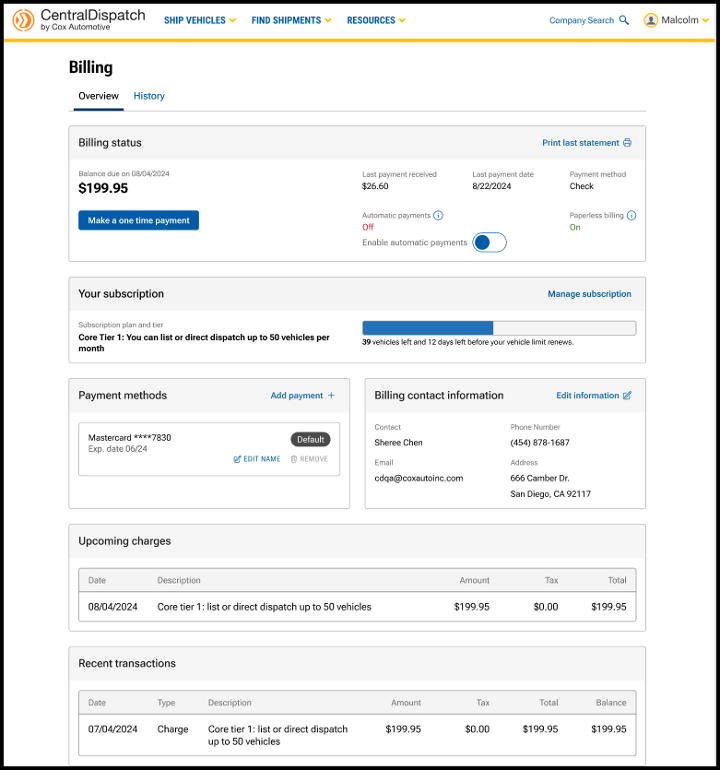
The billing page has been updated with a reorganized layout to prioritize the most important information and provide an intuitive, user-friendly experience. Multi-factor authentication provides an extra layer of security to the account and is required to make any changes to the page. Users with the role of Owner or Admin in Manage Users have permission to make changes after the multi-factor authentication. The billing page is available from the account name dropdown, by selecting Billing.
Billing Status

- Link available to Print last statement
- Click on the History tab to view and print previous months’ statements
- View Balance due and the due date
- Note: Please note the amount displayed is not due until the Balance due date
- Make a payment by clicking on Make a one time payment
- Note: If moving to a new tier, make a one time payment for only the dollar amount difference between the tiers to get access to the new tier
- Choose to pay balance or another amount
- Choose payment method

- Users can also click toggle to Enroll in autopay when making a payment
- Previous payment information including payment amount, date and payment method
- Toggle to Enable Automatic Payments on or off

Result: A confirmation message will appear for users to confirm automatic payments
Your Subscription

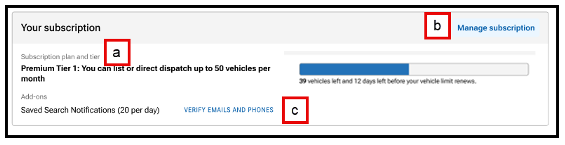
- View your subscription plan and any add-ons to your account, such as notifications
- Tier limits are based on vehicles that are posted or dispatched
- Each vehicle that is listed or dispatched counts toward the monthly vehicle quota
- When the tier limit is reached, it will trigger a notification to the user, and additional vehicles will not be able to be dispatched or listed until next billing cycle, and the user cannot upgrade to the next tier
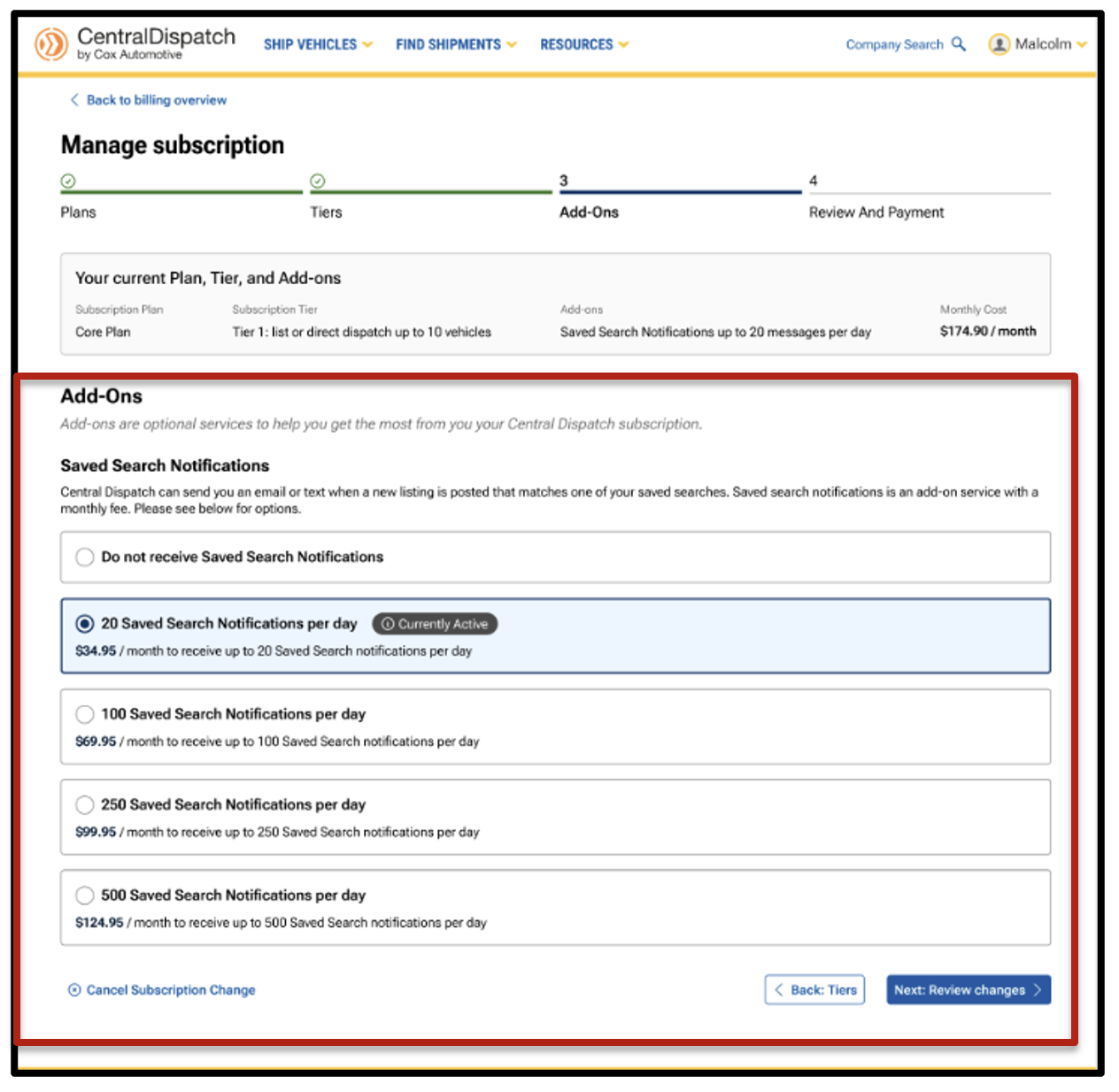
- Click on Manage subscription to view the subscription plan options, tiers available, and any add-ons selected
Steps to Upgrade and Downgrade
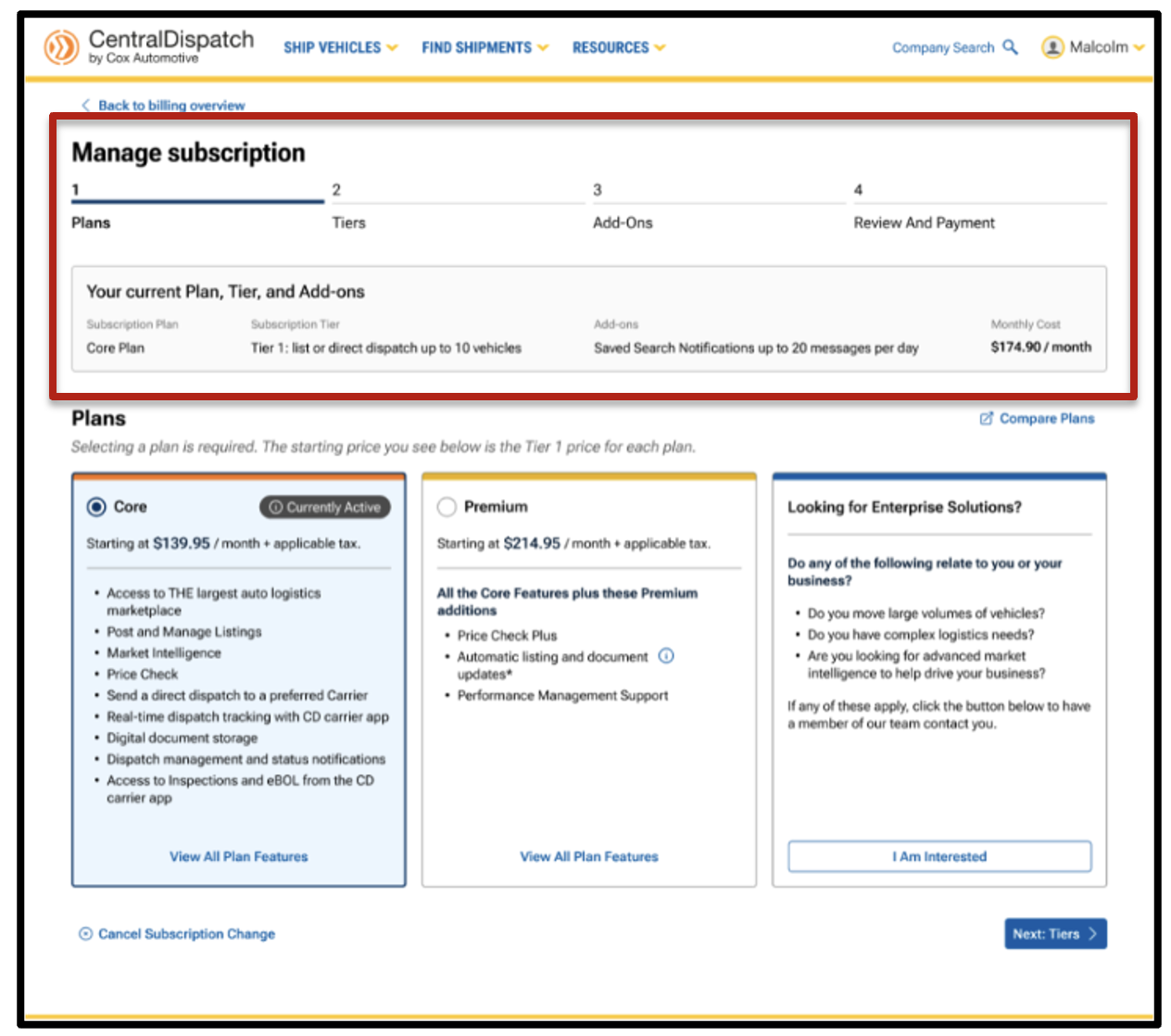
- View current plan, tier, add-ons, and price
- Choose plan and tier
- Customers can move back and forth to adjust selections without starting over, reducing frustration and confusion
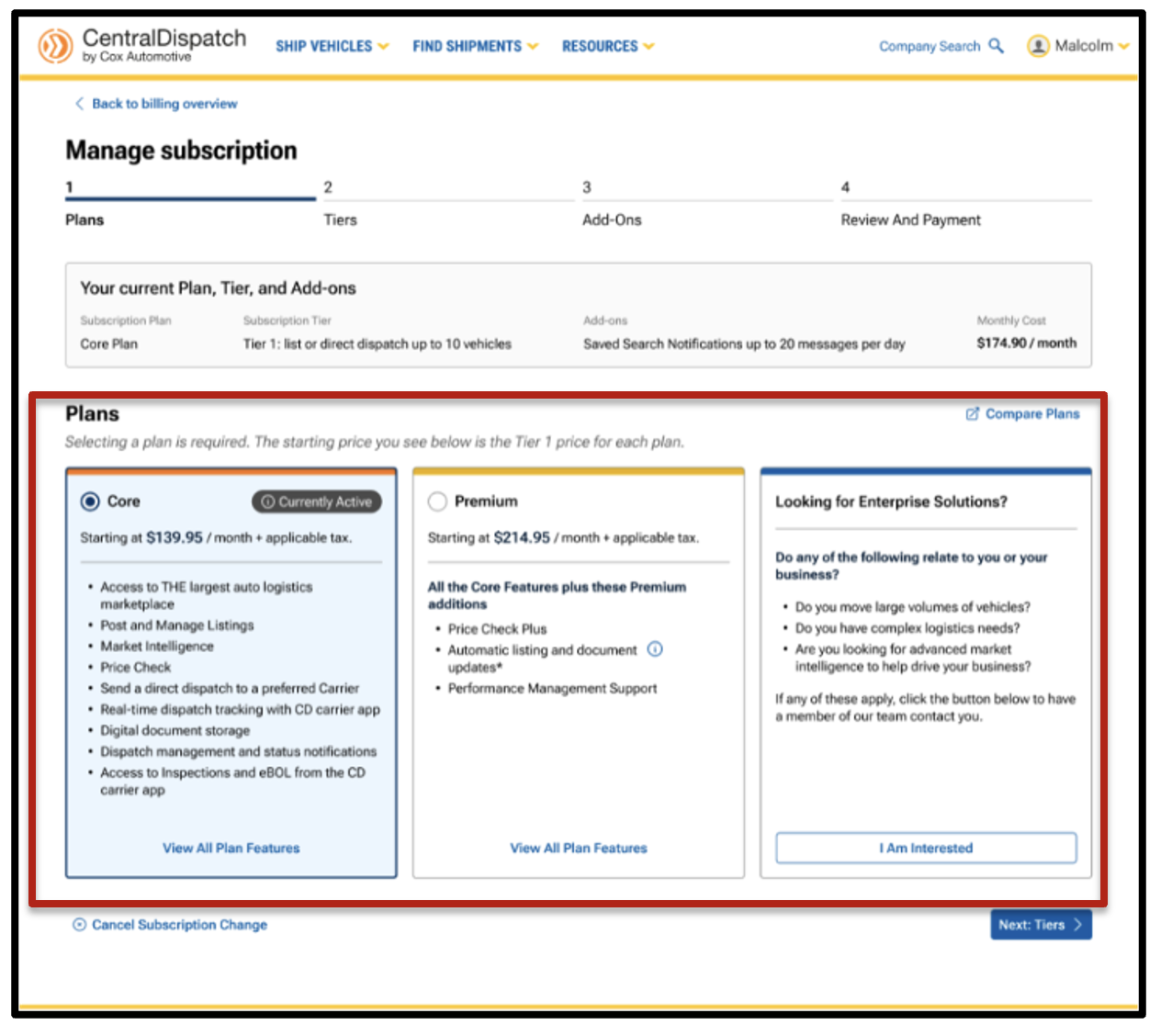
- Customers can move back and forth to adjust selections without starting over, reducing frustration and confusion
- Choose add-ons
- Customers have clear visibility into available add-ons (such as Saved Search Notifications), with pricing and quantity displayed inline
- The system defaults to current selections with simple opt-in and opt-out options
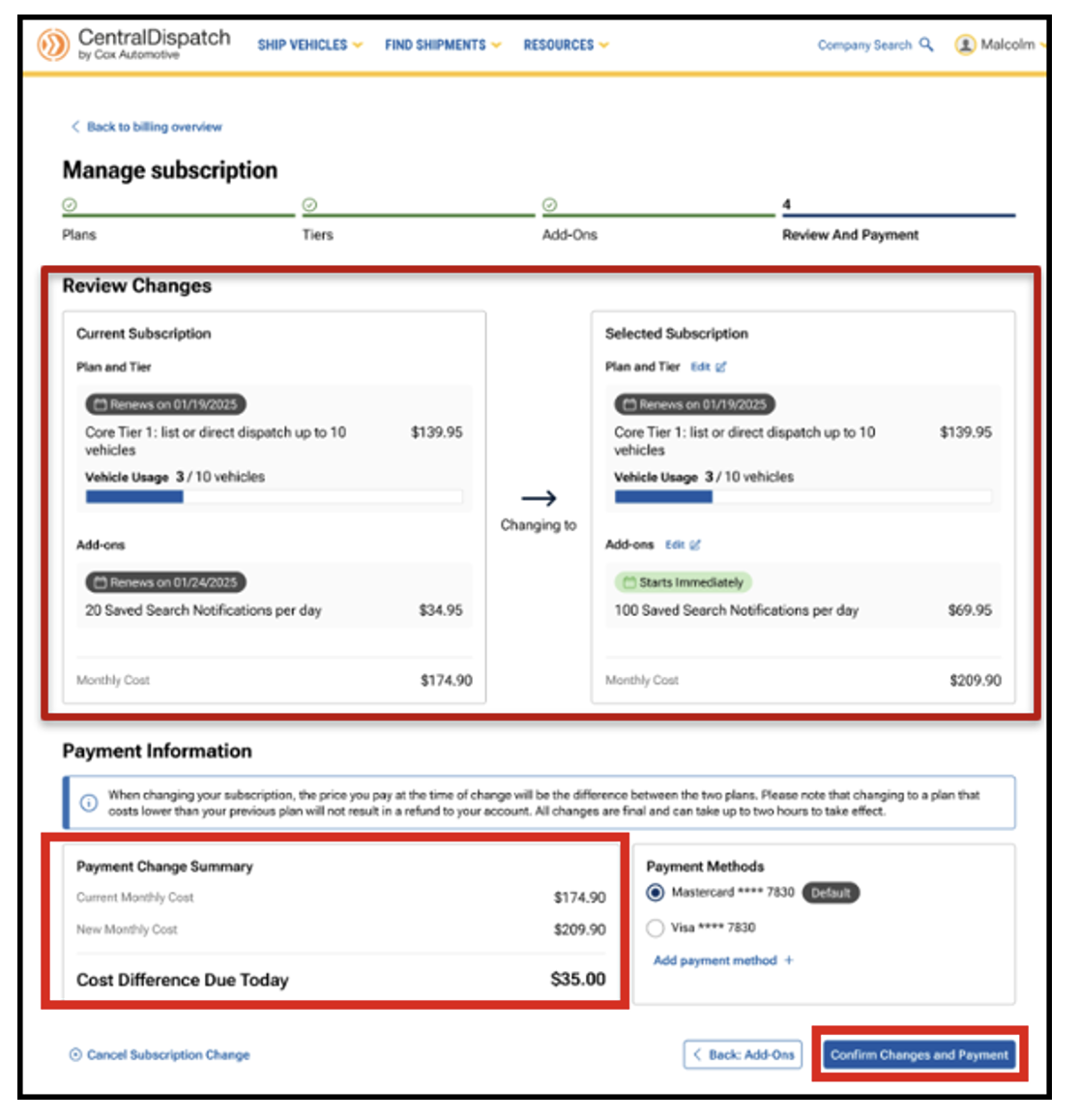
- Review side-by-side comparison of changes and payment information
- Costs, upgrades, and differences due today are shown clearly before checkout, helping customers understand exactly what they’re paying for
- Customers can clearly see their current plan vs. proposed changes before confirming anything
- Payment Information will display the summary of charges based on changes selected. It will also display the Cost Difference Due Today based on the difference between the previous plan and new plan selected.
- NOTE: Cost Difference Due Today does not include past due charges that are due.
- NOTE: Cost Difference Due Today does not include past due charges that are due.
Payment Methods and Billing Contact Information

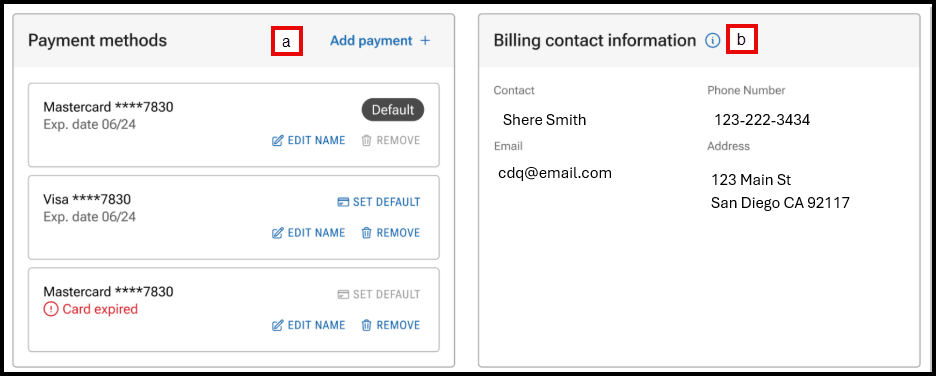
- Manage payment methods, including setting a default card, and adding or removing a card
- Click on EDIT INFORMATION to update billing contact information
- Result: The Company Profile page will open to the Contacts section and Billing Contact

- Result: The Company Profile page will open to the Contacts section and Billing Contact
Upcoming Charges and Recent Transactions
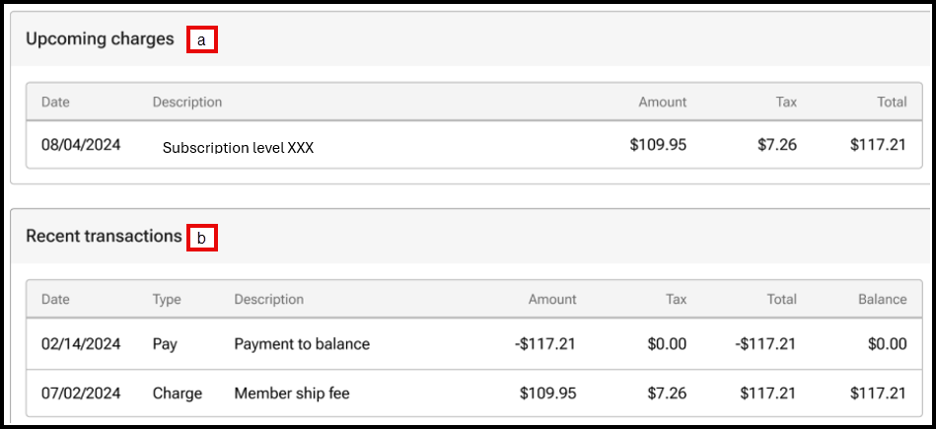
- View upcoming charges
- View the five most recent transactions. Users can view additional transactions under the History tab on the Billing page
Billing History tab
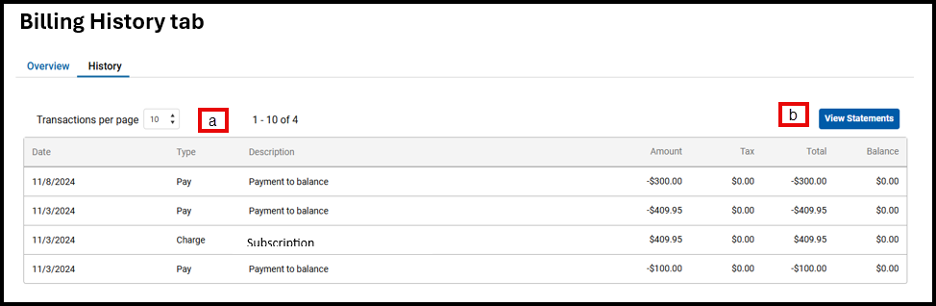
- Select the number of transactions per page to view the previous transactions
- Click View Statement to view statements for previous months
FAQs
Yes. The new experience is designed to be self‑service. Customers can upgrade or downgrade on their own using the step‑by‑step process and see all changes clearly before confirming.
No. Nothing is applied until the customer confirms on the final Review and Payment screen.
Yes. The final review page shows a side‑by‑side comparison of the current subscription and the new selection, including plans, tiers, add‑ons, and cost.
Yes. Customers can move back to earlier steps (Plans, Tiers, or Add‑Ons) and make changes without starting over.
Add‑ons are shown as separate, optional selections with pricing clearly displayed. Customers can opt in or opt out and adjust quantities as needed before confirming.
Yes. The system clearly shows:
- The new monthly cost
- Any cost difference due today
- When changes take effect
There are no surprises at checkout.
Downgrades follow the same guided process. Customers can see the impact of the downgrade, including feature changes and pricing, before confirming.
Upgrades take effect immediately, and any pricing difference due today is shown on the final screen before confirmation. Downgrades take effect on the next billing cycle.
The guided layout and plan comparisons help customers understand their options. Agents can also walk them through the screens, and customers can review and change selections before confirming.
The new process is designed to be clearer, easier to follow, and more transparent—helping customers feel confident with making changes while reducing frustration and support calls.
Learn what actions do and don’t affect your vehicle counts
Starting on your first billing date after February 14, 2025, Central Dispatch will be aligning with the industry standard vehicle count methodology. That means that each vehicle you post will count towards your tier limit, even if it is part of a multi-vehicle listing or dispatch.
This change will apply to every shipper account and impact your tier limit, no matter what Central Dispatch tier plan you have. As part of this update, we are increasing all tier limits to account for this change. Our updated plans start at $139.95 for 10 vehicles per month, with revised vehicle limits across all tiers. Learn more about our different plan options.
To help all our customers adjust to and get the most out of this new system, we’ll be sending you in-platform notifications if you approach your monthly vehicle tier limit.
And don’t forget to read the lists below to see which in-platform actions will and will not impact your monthly vehicle tier limit.
Vehicles will now be counted toward your tier limit when:
- Added during listing creation
- Added during listing creation from a delivered or archived dispatch
- Relisted from an expired listing
- Relisted with different vehicle(s)
- Added in the listing editor
- Added during conversion from listing to dispatch
- Added during dispatch creation
- Added in the dispatch editor
- Edited vehicle(s) in dispatch editor (if VIN or Year, Make, or Model is changed)
Vehicles will NOT be counted toward your tier limit when:
- Deleted during listing creation
- Edited in listing editor (YMM or VIN)
- Deleted in the listing editor
- Converted from listing to dispatch without adding vehicle(s)
- Edited vehicle(s) in dispatch editor (no changes to VIN or Year, Make, or Model)
- Edited VIN-less vehicle with VIN in dispatch editor
- Deleted in the dispatch editor
- Copy from an unexpired listing to a new listing with the same vehicle(s) after a dispatch was canceled or declined
We want to make this process seamless for you and are committed to continuously improving the platform with new features to help you operate your business efficiently and profitably. Please reach out to us with any questions at 800-928-7869.
Ship with more power & profit
Shippers can now access the most powerful shipping experience with Central Dispatch premium. This premium plan offers best-in-class transportation tools and unmatched professional support. Maximize vehicle profitability with Price Check Plus, streamline your process with a suite of APIs, and dispatch directly to your preferred partners with Direct-to-carrier offers, coming soon. Plus, uncover new opportunities to drive efficiency and profit with Performance Management.
Discover more about Central Dispatch Premium and all of our plan options!
