

Invoices just got easier for carriers, and more transparent for shippers. Carriers can now add incremental expenses right from the mobile app! Whether it’s an unexpected toll, storage fee, or other incidental cost, any charge can be quickly and easily attached to an invoice in real-time, ensuring all expenses are clearly documented and instantly visible to shippers. All in one centralized platform!
No more off-platform communication or confusing bills. Carriers can just open the app, navigate to a load details page, and add a charge with a few taps. Plus, built-in notifications keep both parties up-to-date on invoice changes, while editable charges provide flexibility when updates are needed.
In addition, carriers can now more dynamically interact with the eBOL in the Central Dispatch app, bringing the same functionality available in the web experience. Now, there’s no need to transition back and forth from the web experience to view and interact with inspection data and photos while on-the-go.
View the step-by-step guides on adding invoices and viewing eBOL, and download the Central Dispatch mobile app today!
Introducing an all-new way to access your Central Dispatch account. With the authenticator app, you receive a time-based sign-in code that’s instantly accessible right from your phone!
Why We’re Doing This
The authenticator app gives you a secure way to complete multi-factor authentication (MFA) without relying on email or SMS, and provides a reliable alternative when text message codes aren’t available. It’s part of our commitment to protecting users, and ensuring everyone can easily access their account.
What it Means for International Users
Users outside the United States, Canada, and Puerto Rico (whose phone numbers do not support text verification) will be required to enroll in the authenticator app.
What it Means for Domestic Users
Domestic users can choose to enroll as a preferred verification method, or as an alternative method in case of issues or outages with text codes.
Sign in via the authenticator app will be rolling out to users starting in April through late May. Learn more about the app and how to use it in our user guide.
The authenticator app provides a MFA (multi-factor authentication) process for users that do not have access to a supported phone number for SMS verification and as an additional option for users other than SMS verification.
Central Dispatch does not support SMS verification for international phone numbers, users outside of the U.S., Canada, and Puerto Rico. These users are currently verifying using email; the authenticator app is a more secure process.
Table of Contents:
- Authenticator App Overview
- First time log in for users after Authenticator App rollout
- When verifying using an Authenticator App
- Installing an Authenticator App
Authenticator App Overview
- The authenticator app is offered as an alternative to phone-based MFA.
- Domestic Users (U.S., Canada, Puerto Rico)
- Users are required to have a recovery phone number listed in My Profile
- Users can also enroll in the authenticator app as an alternative option, if they do not want to use their phone
- Note: If the user is not enrolled in the authenticator app, they cannot change the MFA method to authenticator app during login (example, Verizon goes down, user cannot switch to authenticator app instead of phone number during log in.) The user would need to enroll in the authenticator app through My Profile.
- Users Outside the U.S., Canada, or Puerto Rico
- Phone numbers outside of the U.S., Canada, Puerto Rico are not supported for MFA.
- Users are automatically taken to the authenticator app page when logging in.
- Email verification will not be available
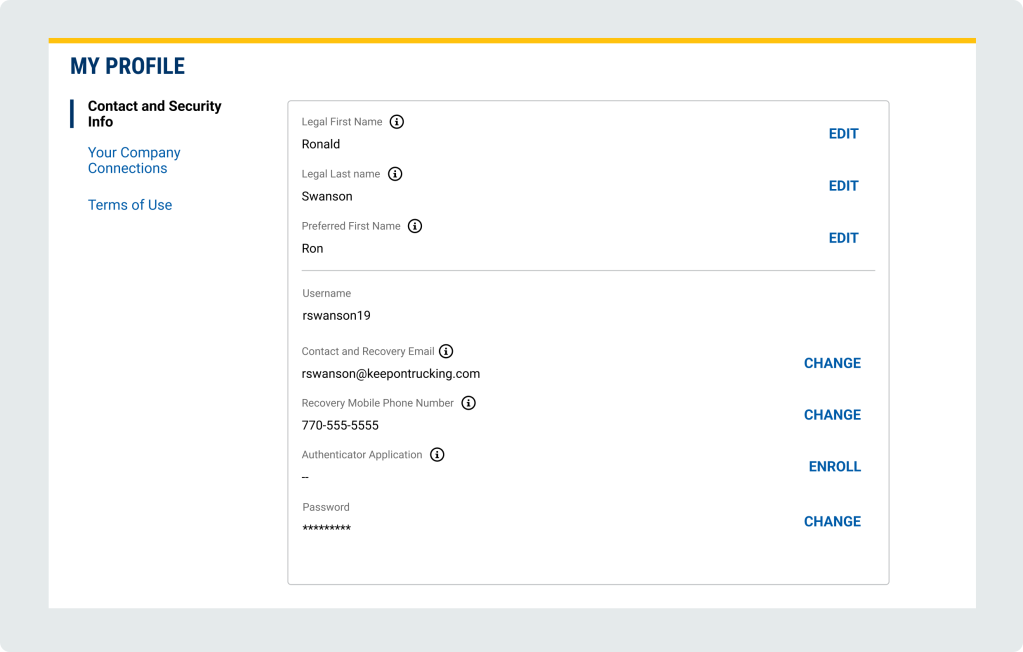
My Profile – Contact and Security Info
- Legal First Name and Legal Last Name: must match what is present on driver’s license, passport or other legal documents
- Preferred First Name: used in communications to clients and on users’ profile
- Username: used to log in to an account
- Recovery email: will only use to verify account if authenticator app or phone number is not available. Will not be displayed on account or shared
- Recovery phone number: Only used to verify or recover the account. Will not be displayed on account or shared
- Authenticator Application: Used to verify or recover the account for or users outside of U.S., Canda, Puerto Rico. domestic users. Can be used as an alternative to phone numbers for domestic users.
- Password: Used to log in to an account
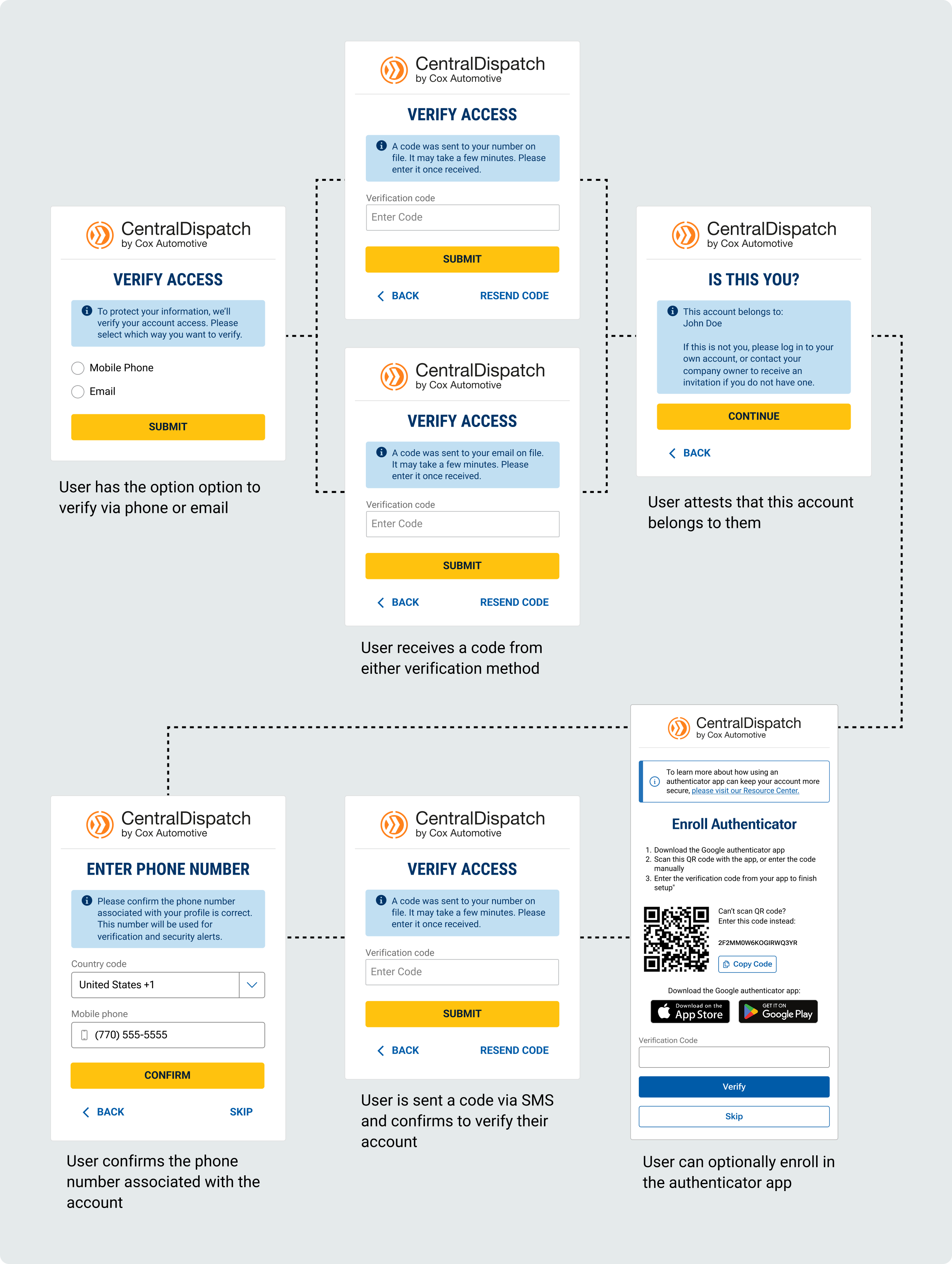
First time log in for users after Authenticator App rollout:
Scenario 1: User has a phone number listed in My Profile:
- User will verify account using the recovery email or recovery phone number in My Profile
- After successful verification the user will be taken to the authenticator app screen and can enroll, user can also Skip enrollment in app
- Note: if users skip enrolling in authenticator app, they can enroll at any time through My Profile
- Note: if users skip enrolling in authenticator app, they can enroll at any time through My Profile
- After the initial log-in after authenticator app roll-out
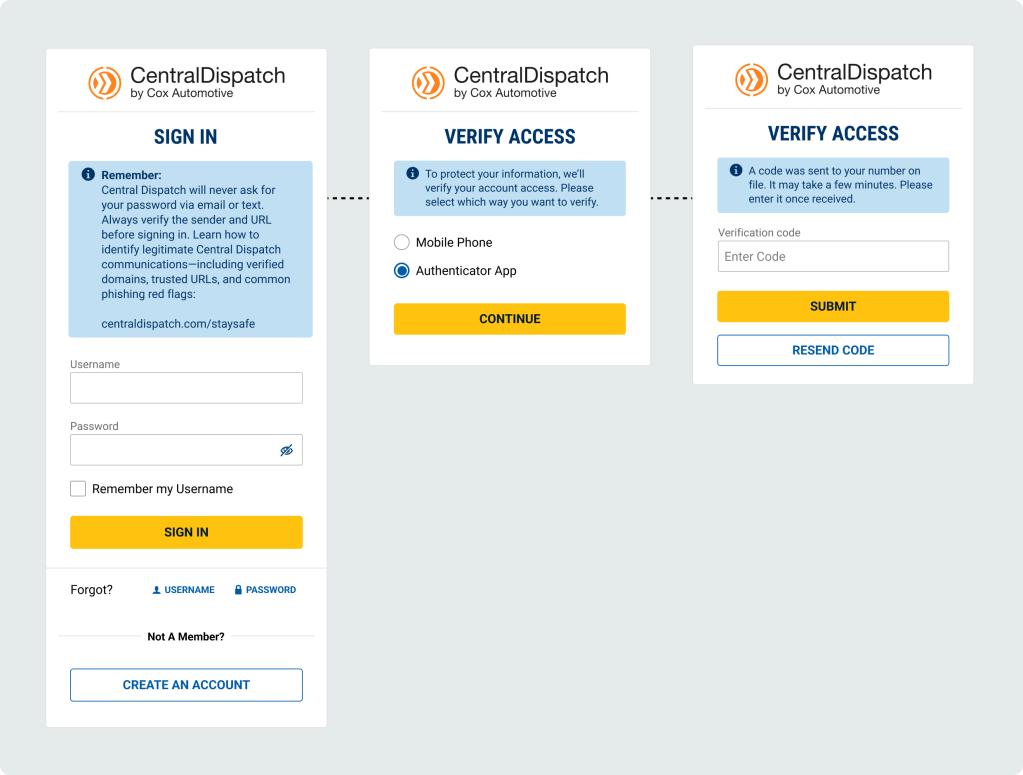
- Users that enrolled in authenticator app will have option to verify using authenticator app or Mobile Phone
- Users that did not enroll in authenticator app will automatically have verification code sent to mobile phone (will not see middle screen)
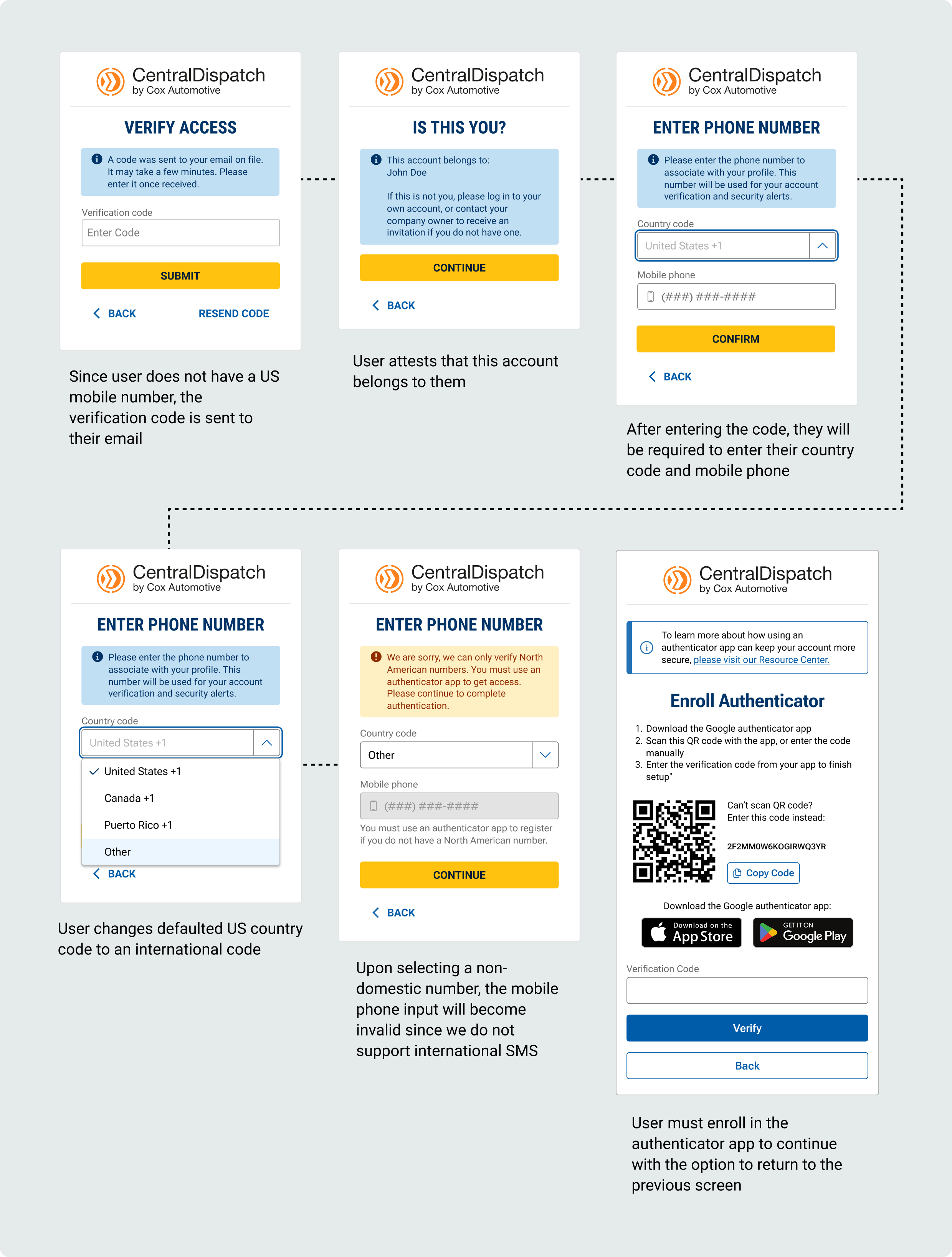
Scenario 2: User does not have a phone number listed in My Profile, but is a domestic user with a phone inside the U.S., Canada, or Puerto Rico
- User will verify account using the recovery email in My Profile
- After successfully entering the verification code, the user will be taken to a confirmation screen to attest the account belongs to them
- Users will be asked to enter a recovery phone number to their profile by entering the country code for the phone number
- Since country code is U.S., Canada, or Puerto Rice, the user will be taken to the authenticator app screen and can enroll, user can also Skip enrollment in app
- Note: if users skip enrolling in authenticator app, they can enroll at any time through My Profile
- Note: if users skip enrolling in authenticator app, they can enroll at any time through My Profile
- After the initial log-in after authenticator app roll-out
- Users that enrolled in authenticator app will have option to verify using authenticator app or Mobile Phone
- Users that did not enroll in authenticator app will automatically have verification code sent to mobile phone (will not see middle screen)
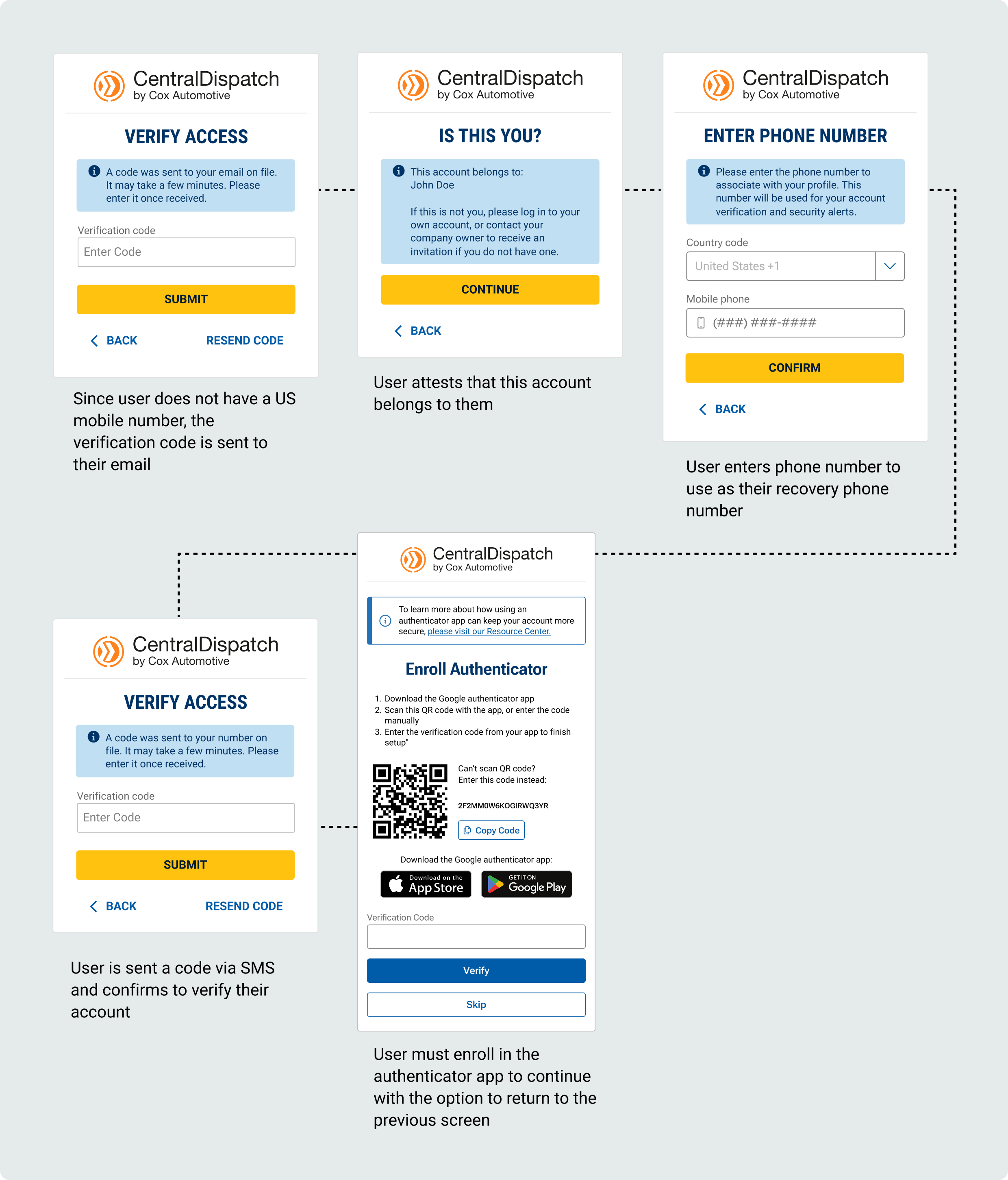
Scenario 3: User does not have a phone number listed in My Profile and is outside the U.S., Canada, or Puerto Rico
- User will verify account using the recovery email in My Profile
- After successfully entering the verification code, the user will be taken to a confirmation screen to attest the account belongs to them
- Users will be asked to enter a recovery phone number to their profile by entering the country code for the phone number
- If the Other code is selected, the user will not be able to enter the mobile phone number with a message that we do not support international SMS
- User will be taken to the Enroll Authenticator screen
- User will not be able to skip enrolling in authenticator
- User will not be able to skip enrolling in authenticator
- After the initial log-in after authenticator app roll-out
- Users with a mobile number outside of the U.S., Canada, Puerto Rico will be automatically taken to the screen and instructed to enter the code generated in their authenticator app to verify
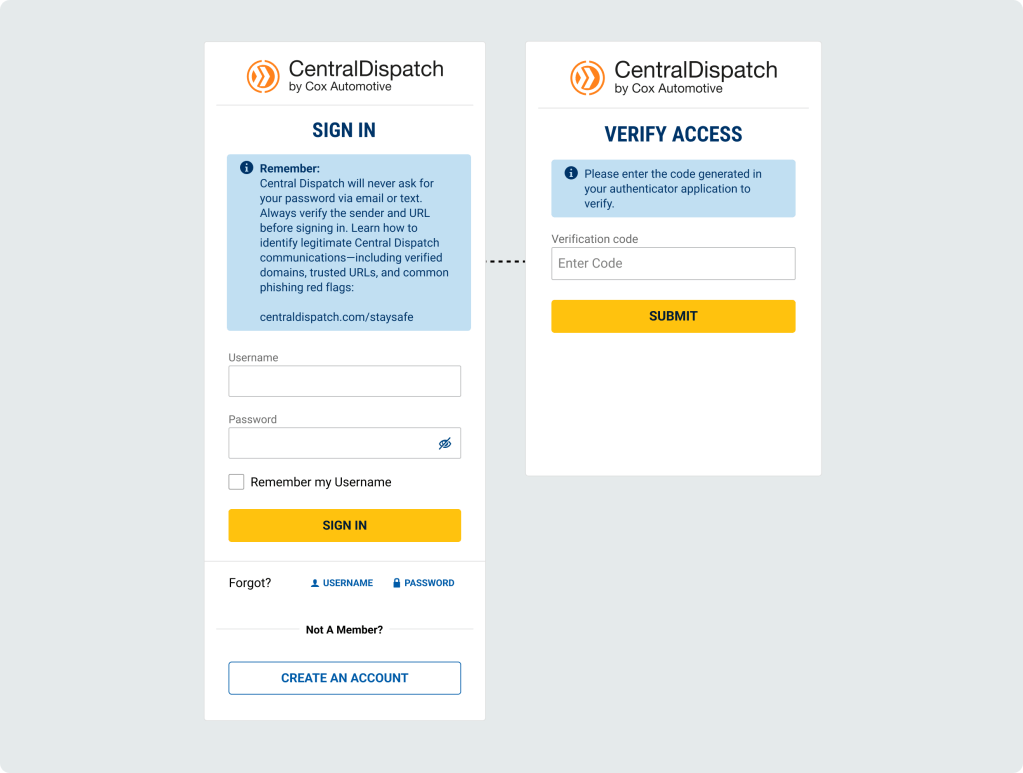
When verifying using an Authenticator App:
When prompted for a verification code:
- Open the Authenticator app
- Find your account name
- Use the 6‑digit number shown
- The number changes every 30 seconds — this is normal
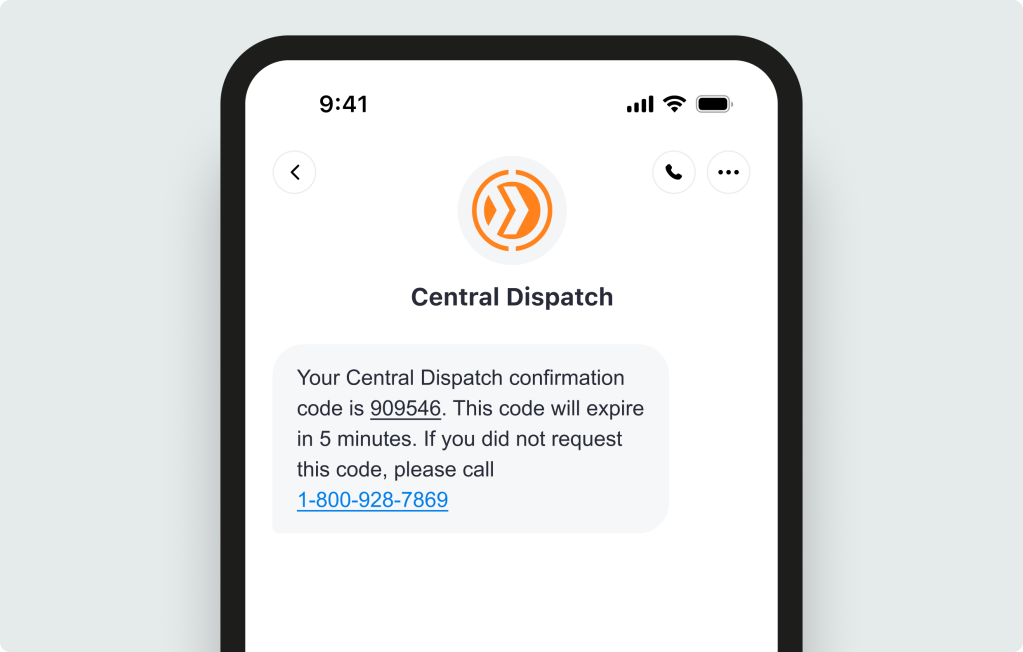
SMS Verification text message:
Installing an Authenticator App
Step 1: Download the App
On your phone:
- Scan the QR code on the Enroll Authenticator screen or open the App Store (iPhone) or Google Play Store (Android)
- The QR code will direct user to Google Authenticator, but user is able to use authenticator of their choice
- Download the app
Step 2: Open the App
- Open the app
- Allow notifications (if asked)
- Allow camera access (if asked)
This helps the app work correctly
Step 3: Set Up Your Account (One Time Only)
In the app:
- Tap Add account, Begin setup, or the + sign
- Google authenticator will ask for users Gmail account, users do not need to use a Gmail account, can add any email address (example, Gmail, outlook, etc)
- Follow the on‑screen steps to finish setup
Step 4: Get Your Code When Signing In
When prompted for a verification code:
- Open the Authenticator app
- Find your account name
- Use the 6‑digit number shown
- The number changes every 30 seconds — this is normal
Quick Tips
- You do not need internet to see the code
- If a code expires, wait for the next one
- Keep the app installed — you’ll use it each time
Allowing carriers to add incremental expenses to an invoice on the Central Dispatch Marketplace from the mobile app provides transparency and allows carriers to manage their entire book of business on Central Dispatch, including incidental charges.
1. Carriers are able to add incremental expenses from the mobile app.
Carriers can add an expense to an invoice up to 30 days after delivery or cancellation
- Adding expenses from the mobile app:
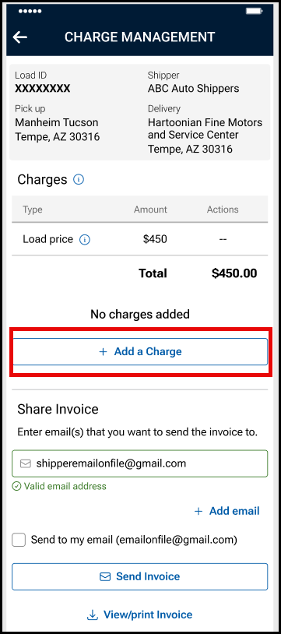
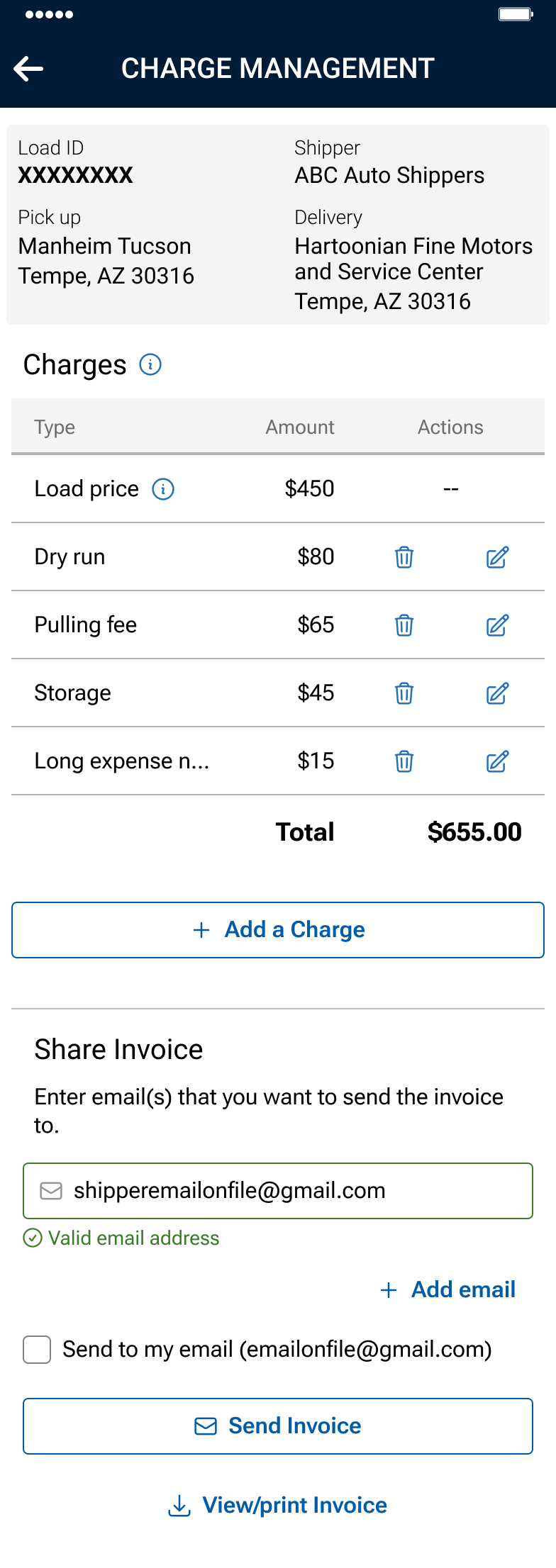
- From the Load Details screen, users with the role of Owner, Admin, and Driver can click the More menu button, and then click Manage Charges from the drop down.
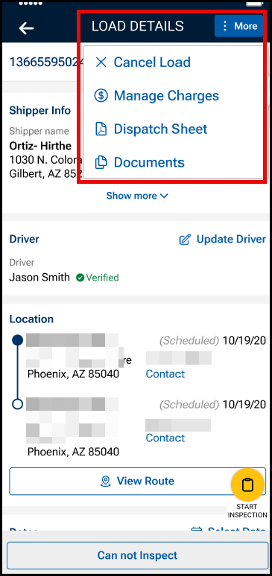
- From the Load Details screen, users with the role of Owner, Admin, and Driver can click the More menu button, and then click Manage Charges from the drop down.
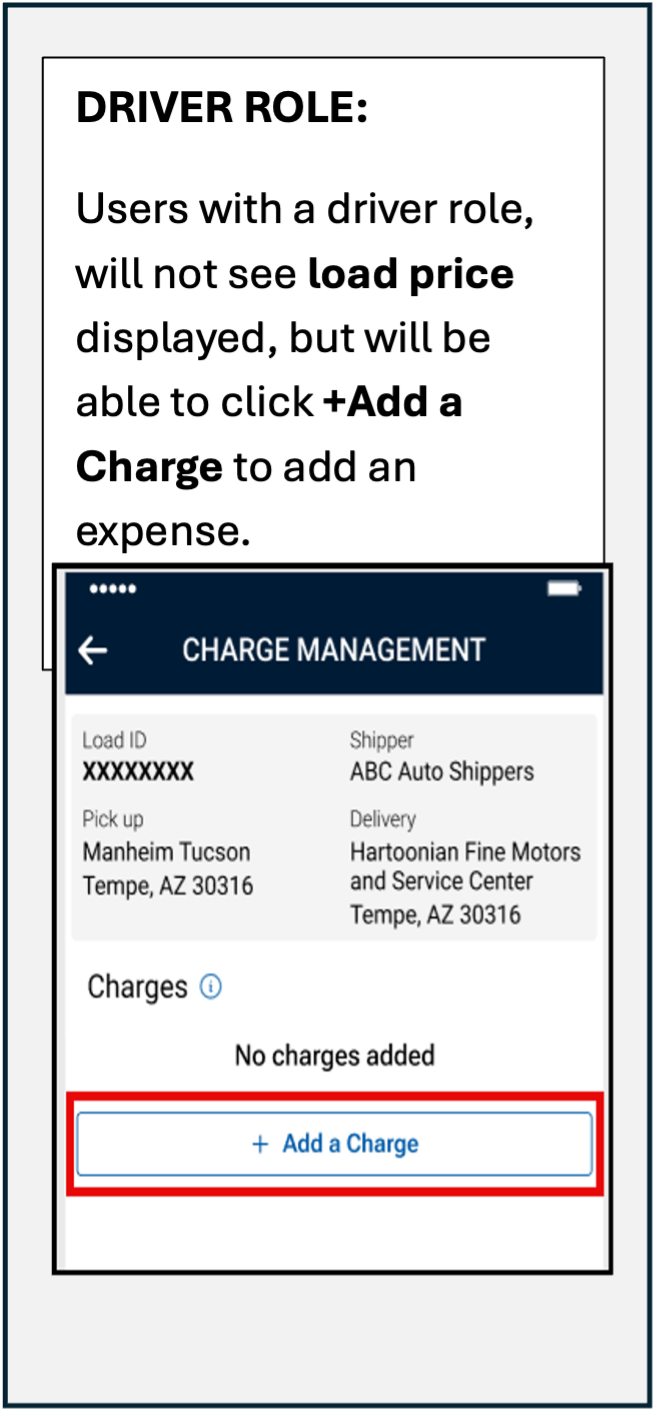
- Click the +Add a Charge button to add an expense to the invoice
- Users can add up to 8 expenses per invoice
- Users can add up to 8 expenses per invoice
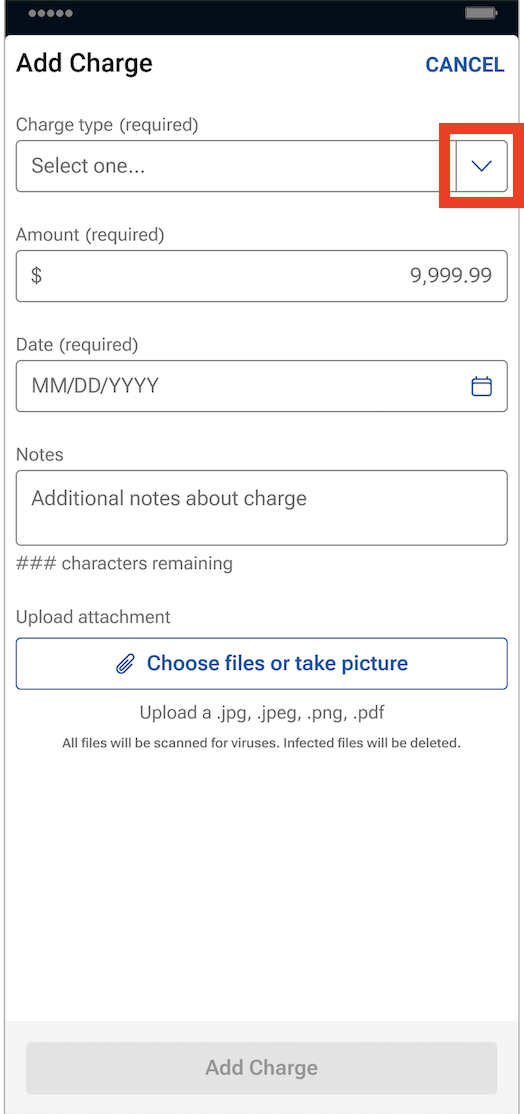
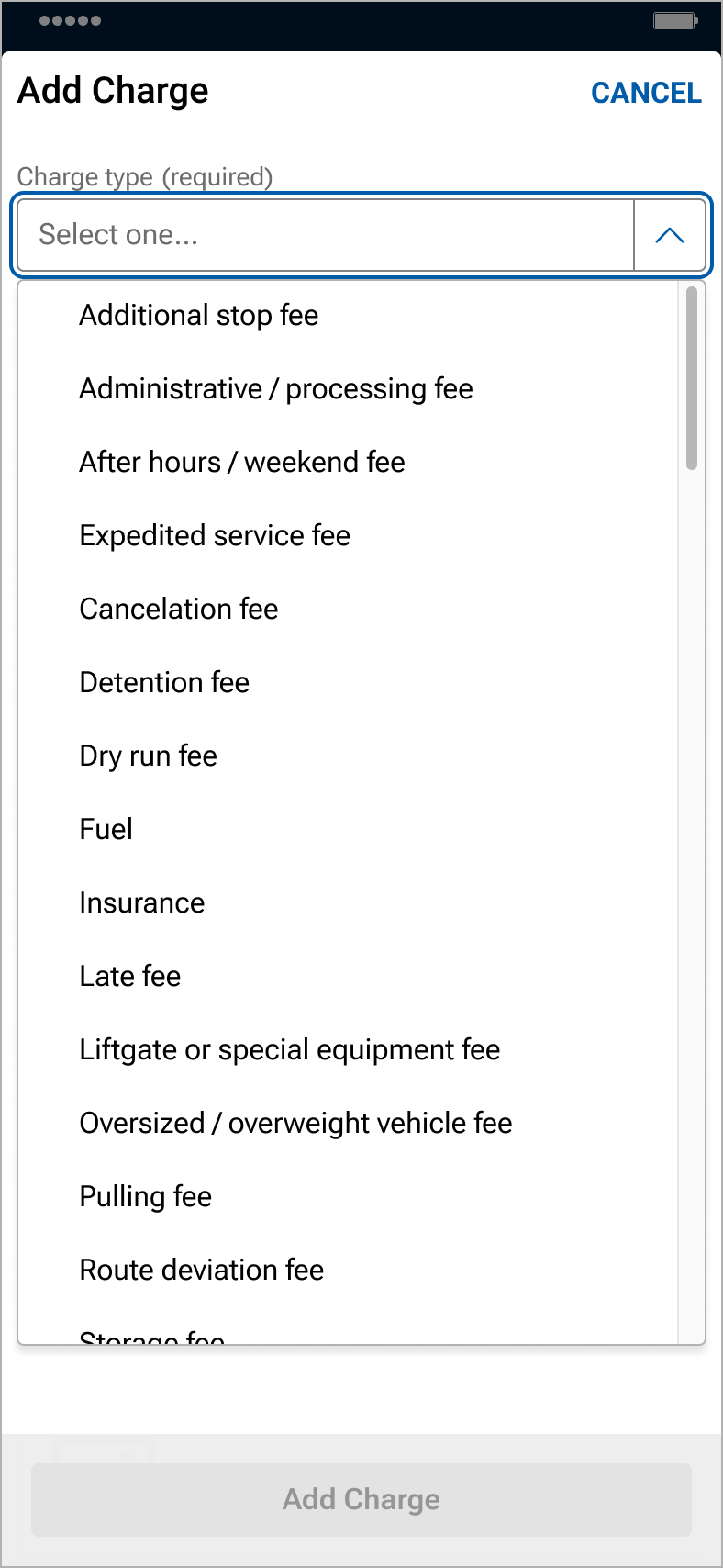
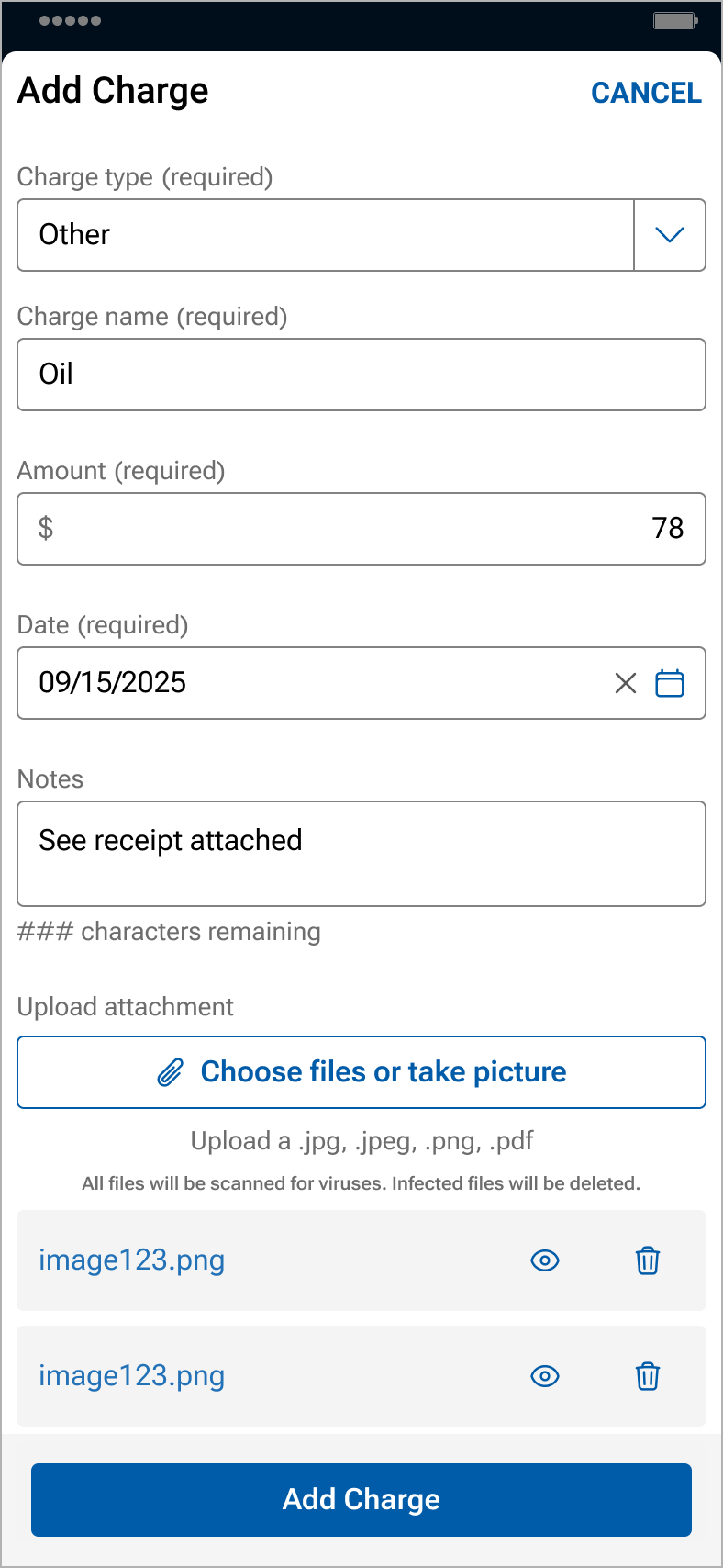
- Use the drop down menu to select the Charge type
- An option of “other” is available in the drop down
- An option of “other” is available in the drop down
- Enter expense information, including the charge name, the amount and date of the expense, and then click Add Charge
- The additional notes field is optional
- Up to 5 files can be uploaded from your files, camera roll, or by taking pictures
- NOTE: Back-up documentation can also be uploaded and added in Central Dispatch.com.
- NOTE: Back-up documentation can also be uploaded and added in Central Dispatch.com.
- Invoices, including expenses, can be viewed by the shipper and carrier on the web browser and the mobile app
- Carriers can delete or modify an expense by clicking on the icon in the expense line
- Carriers can email, download, view, or print the invoice
 Driver role: Will not display load price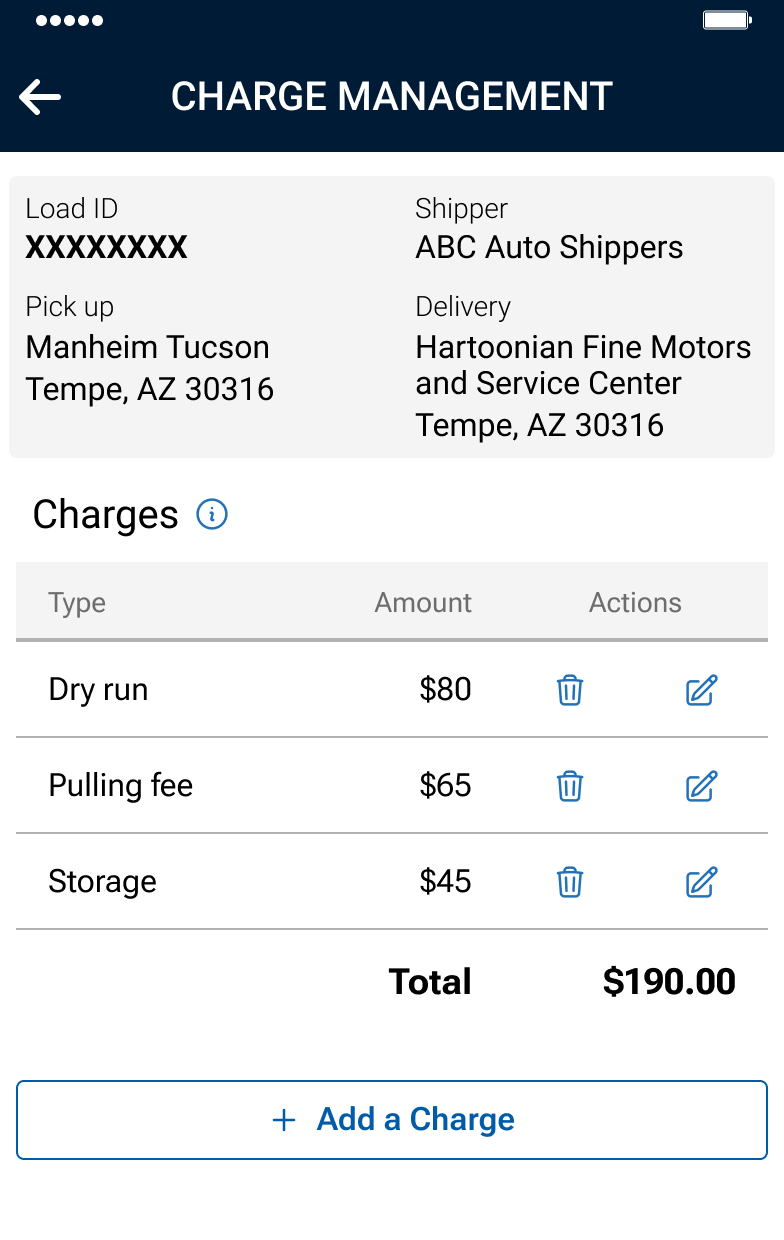
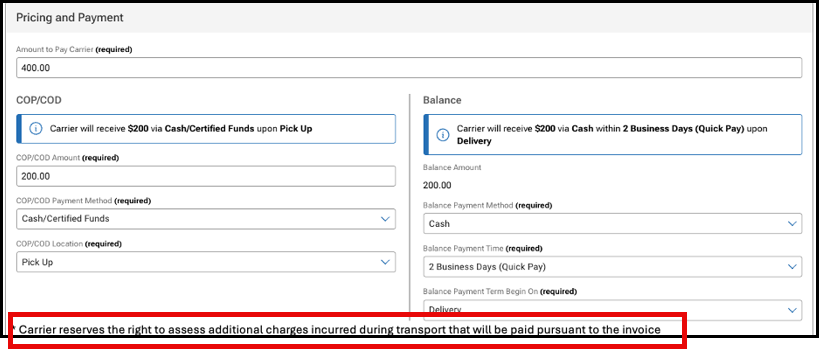
2. When creating loads or dispatching, a notice is displayed to the shipper regarding the carrier’s right to add expenses to the load.
Carriers reserve the right to assess additional charges incurred during transport that will be paid pursuant to the invoice.
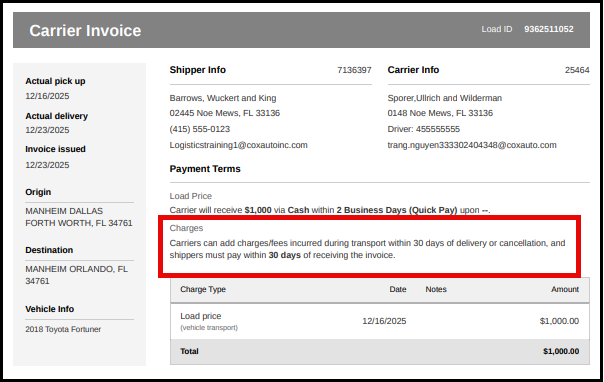
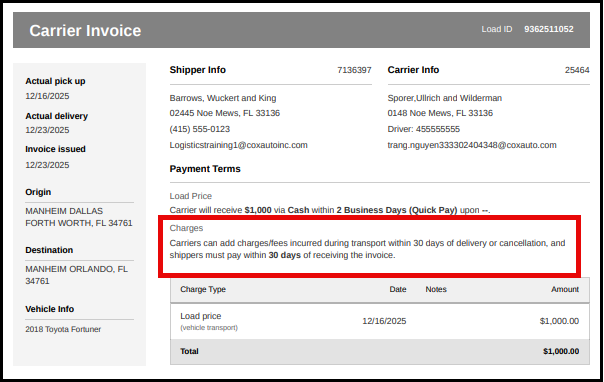
3. A disclaimer will display on the invoice notifying carriers and shippers about adding expenses and the timing
NOTE: Users with a Driver role will not see load price when viewing the invoice
FAQs
Carriers on occasion incur expenses when transporting vehicles, and we want to provide a process on the platform to add transparency for both shippers and carriers rather than communicating the expenses off platform
Adding expenses to an invoice on the web will be a fast follower. Expenses can only be added by a carrier from the Central Dispatch mobile app to start.
Yes, expenses are added based on the load, not individual vehicles in a load.
Expenses are added to the load rather than to a specific vehicle in a load. You are able to add a note when adding expenses, and can indicate the Vin the expense is associated with in that field.
If the shipper does not agree with an expense that was submitted, we encourage them to reach out to the carrier directly to discuss the expense.
If the shipper does not pay the expense, we encourage the carrier to reach directly to the shipper to discuss as they currently do with load payment.
There is not a dispute process since Central Dispatch is not party to the transaction. We encourage the carrier and the shipper to work together to resolve any questions regarding expenses.
If you are not able to resolve the dispute with the other party to the transaction, you can include details in the rating system if the rating window is open. If you do not want to do business with the shipper or carrier in the future, you are able to put the company on your blocked list.
Yes, the carrier can delete or modify an expense from the load page on the mobile app for up to 30 days after the load is delivered or cancelled. The shipper is not able to delete or modify an expense.
The carrier can add expenses up to 30 days after the load has been delivered or cancelled. This information is displayed on the invoice.
There’s a better way to secure more loads for your business. With carrier text and email notifications, you’ll get a real-time alert whenever a vehicle matching one of your saved searches is posted or updated. Each alert includes a direct link to the listing, so you can check it out for yourself with just a tap.
It’s the easiest way to stay informed about loads you’re interested in, be the first to accept the job, and keep your trucks full and earning money. Whether you’re in the office, on the road, or at home!
NEW CARRIERS: You’re automatically enrolled in a FREE notifications trial, with a limit of 20 notifications per day. Make sure you’ve configured your saved searches, so you can start receiving your FREE notifications!
Learn how to create a saved search in this user guide.
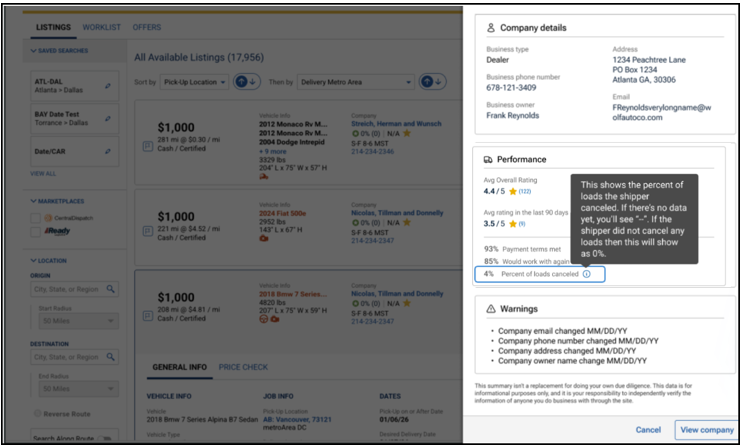
More informed partnering decisions are just a click away. Carriers can now view any shipper’s scorecard, right from the search results page! Just click a shipper’s name to open up a slide-out displaying their comprehensive profile, including company details, Central Dispatch ratings, warnings, and other key information. You’ll also see each shipper’s cancellation percentage for greater transparency into shipper behavior.
It’s the best way to get a more detailed look at any shipper’s performance history, in fewer clicks. Try it out today!
Learn more about the shipper scorecard and how to access here.
Click on the shipper’s name on the listings page to open a slide-out that displays the Shipper’s Scorecard, allowing the carrier to make faster, more informed decisions and reduce risk.
Clicking on shipper’s name from the listing card opens a slide-out form with comprehensive shipper information, including:
- Company details: Name, type, address, owner, phone, and email
- Performance data: Overall rating, number of ratings, average rating for the last 90 days (or “No recent ratings” if none), year established, and membership duration with Central Dispatch (with warnings for accounts less than 30 days old), and the percentage of loads cancelled by the shipper
- Key metrics: Percentage of time payment terms were met, percentage of time carriers said they would work with the shipper again
- Warnings: Recent changes (last 30 days) to company email, phone number, address, or owner name
- Legal disclaimer: Please note, this data is for informational purposes only, and it is your responsibility to independently verify the information of anyone you do business with through the site
- Carriers can click on View Company to view full company overview in a new tab or dismiss the slide-out form and return to the listings page.
Recorded at the NADA Show 2026
Transcript:
Matt Newton, Director of Product, Central Dispatch:
Hey everybody, I’m Matt Newton, Director of Product for Central Dispatch. Today, I want to show you how Central Dispatch is leading the automotive industry in a new standard of trust and security with government ID‑backed verification for our user base of more than 60,000 users across the platform.
Fraud in the automotive transportation industry has become more frequent, more sophisticated, and more costly. As the industry becomes more digital, fraud has emerged as a growing challenge for dealers, brokers, and carriers. To combat this risk and strengthen overall marketplace security, Central Dispatch now requires all users to verify their identities—ensuring every user is linked to a real, trusted individual.
Central Dispatch is the first logistics marketplace to implement platform‑wide identity verification, reinforcing our position as the most trusted and secure marketplace in the industry. What does this mean for you? It means you can have greater confidence in who you’re working with on Central Dispatch.
ID verification also helps us identify situations where users may have multiple usernames. With this process, we can enforce a one‑user, one‑username standard while still ensuring individuals have all the access they need within the platform.
The verification process is simple. All that’s required is a smartphone or tablet with a camera and a government‑issued ID. Users scan their ID, take a quick selfie, confirm their information, and that’s it.
All new and existing users are required to complete ID verification to continue accessing the Central Dispatch marketplace. Users who do not complete verification will no longer be able to access the platform.
To support this rollout, we’ve partnered with Socure and other leaders in the digital identity verification space. These partners work with more than 3,000 organizations, allowing us to apply proven best practices directly within our platform. Our identity verification experience supports IDs from more than 180 countries, including driver’s licenses, passports, national IDs, and green cards—ensuring our diverse, global user base can complete the process quickly and easily.
ID verification builds on, but does not replace, the other security measures Central Dispatch has implemented. These include enhanced multi‑factor authentication at login and when making changes to user or company profiles, as well as notifications for profile updates or when a new device accesses an account.
We’ve also introduced a new carrier scorecard designed for dealers. This scorecard provides a snapshot of carrier information sourced directly from FMCSA, along with transactional ratings that reflect carrier performance on Central Dispatch.
Together, these security measures—combined with ID verification—form the foundation of a more secure, trusted marketplace and support a safe, end‑to‑end experience on Central Dispatch.
Thank you for your time, and I hope you enjoy the rest of your time here at NADA.
Features:
- A Cleaner design, making it easy to find the information you need available on Central Dispatch.com and the mobile app
- Vehicle information is located along the left side of the invoice, which includes pick-up and delivery dates, invoice date, origin and destination, and vehicle information
- Load ID, along with Shipper and Carrier information, is located at the top
- Payment terms is located in the main section
- Note: Users with a Driver role will not see load price on the invoice
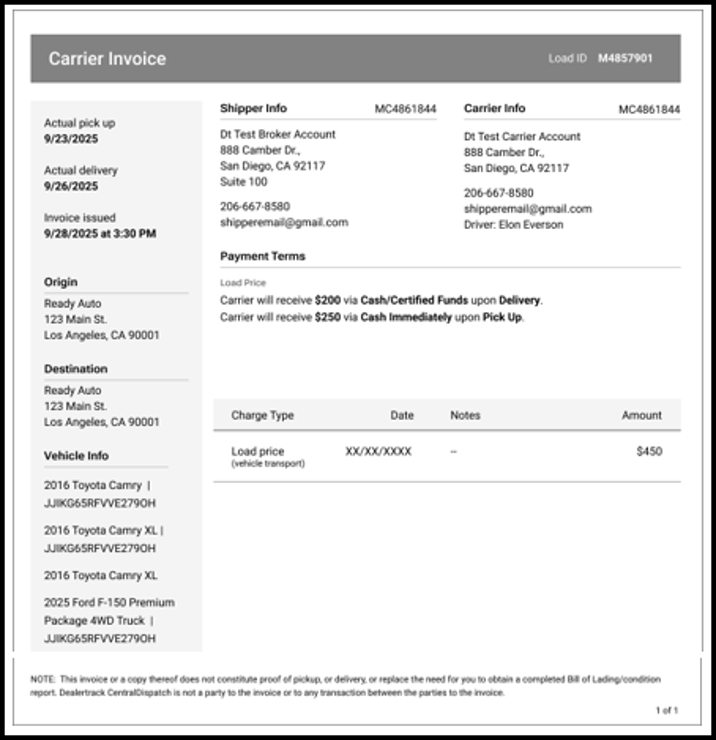
Note: The Notes and Contract Terms sections were removed since they are relevant to the dispatch function, and are part of the Dispatch Sheet.
