User Guide
Viewing Shipper Scorecard from Listings Page
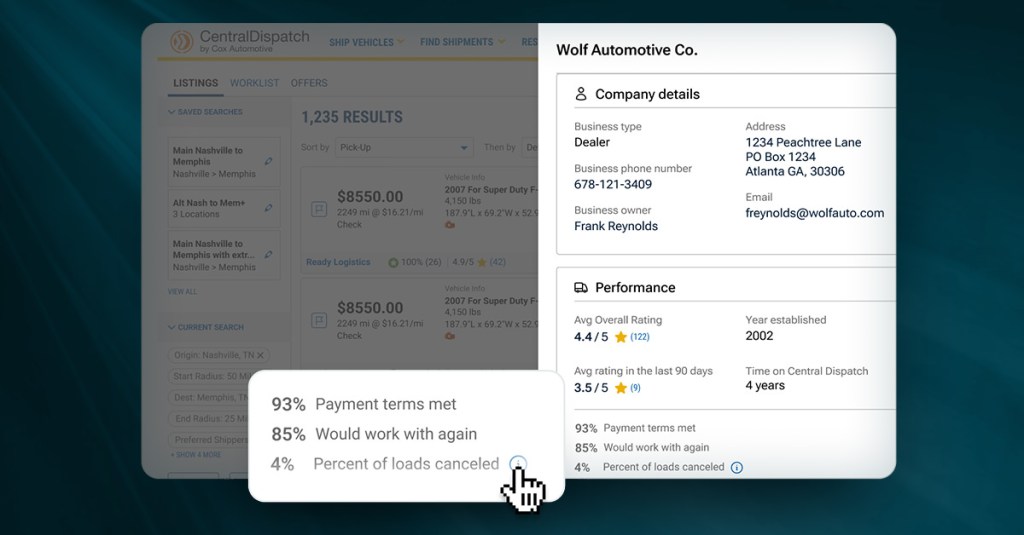
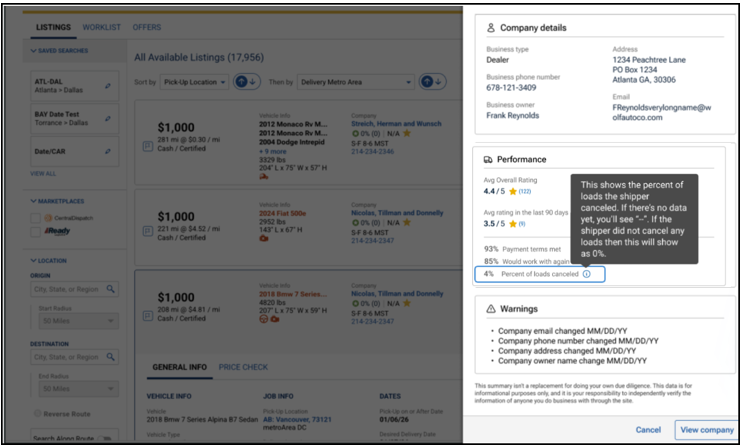
Click on the shipper’s name on the listings page to open a slide-out that displays the Shipper’s Scorecard, allowing the carrier to make faster, more informed decisions and reduce risk.
Clicking on shipper’s name from the listing card opens a slide-out form with comprehensive shipper information, including:
- Company details: Name, type, address, owner, phone, and email
- Performance data: Overall rating, number of ratings, average rating for the last 90 days (or “No recent ratings” if none), year established, and membership duration with Central Dispatch (with warnings for accounts less than 30 days old), and the percentage of loads cancelled by the shipper
- Key metrics: Percentage of time payment terms were met, percentage of time carriers said they would work with the shipper again
- Warnings: Recent changes (last 30 days) to company email, phone number, address, or owner name
- Legal disclaimer: Please note, this data is for informational purposes only, and it is your responsibility to independently verify the information of anyone you do business with through the site
- Carriers can click on View Company to view full company overview in a new tab or dismiss the slide-out form and return to the listings page.