

In this month’s edition of Central Dispatch Highlights, we cover enhancements to Price Check, new dynamic rating windows, and more!
Rating windows now align with payment dates
We heard you: We’re moving away from fixed 14-day rating windows, to dynamic windows that adjust based on each load’s payment date. That means carriers can now rate shippers based on payment behavior and accurately capture their experience — giving everyone more clarity into each rating.
See the most relevant listings with new Price Check filters
Price Check’s new comparable listing filters help you focus on the listings that matter most. Just filter by trailer type or date to see the most relevant listings, and make faster, more informed decisions!
Read about our people-focused approach to AI
We’re using new AI technology to create tools like Price Check Plus that give you clearer data and smarter recommendations, so you stay in the driver’s seat.
There’s a moment every shipper and carrier knows well: The pause before setting a price or accepting a job. Is this rate too high? Too low? Will this vehicle sit on the load board for days, or get to my lot in time? Is the asking price competitive? Will it make money for my fleet?
For years, those questions were answered using gut instinct, a handful of recent comps, and luck. But with help from new AI insights, that’s changing — and it’s changing in a way that keeps shippers and carriers in the driver’s seat.
Pricing AI That Works with You
Central Dispatch is built on a foundation of real transactions between shippers and carriers: Millions of moves across every state, route, and market condition. It’s a huge part of why customers trust the platform.
Now, that same foundation of transportation data is powering something new: Price Check Plus, a tool that brings AI-driven pricing recommendations directly into the listing and load searching processes. But Price Check Plus doesn’t make decisions for you. It’s a guide — giving you clear, real-time information so you can make an informed decision with confidence and speed.
It’s a great example of what Cox Automotive Intelligence (CAI) means in practice. It’s not automation for automation’s sake. Price Check Plus leverages AI in a targeted way to solve a specific pain point for businesses, and help them work with greater efficiency and profitability.
How Price Check Plus Works
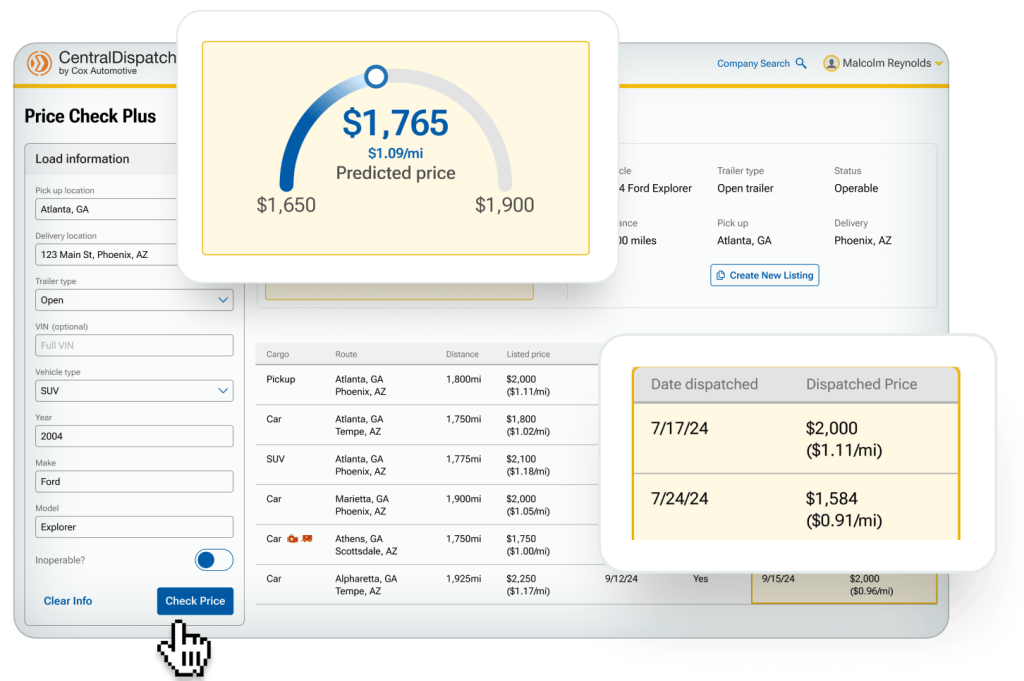
When you’re listing a vehicle or evaluating a load, Price Check Plus draws on millions of historical transactions to generate a pricing range for the load, and a recommended price within that range. It also generates an estimated time to dispatch, helping you understand the tradeoff between pricing higher and waiting longer, versus pricing competitively and moving faster.
With this information available with a single click, carriers can instantly see if a load’s asking price is competitive and decide if it’s worth it for their business, while shippers can easily balance their timing and budget needs.
Built on the Most Complete Transportation Data Available
AI is only as trustworthy as the data behind it, and Price Check Plus is powered by millions of real-world transactions and shipping outcomes from the Central Dispatch marketplace. Not estimates, but the actual prices loads were listed at, the prices they were dispatched at, and how long each took to move.
That breadth of data matters because transportation isn’t uniform. Routes vary. Trailer type availability fluctuates. Market conditions change week to week. Both shippers and carriers can trust these pricing recommendations because they dynamically reflect the full complexity of what’s happening in the marketplace, not just a simplified average.
Fewer Surprises, More Consistency
One of the most consistent frustrations in vehicle transport isn’t the big disruptions, it’s the small friction points that add up: Conflicting information, unexpected delays, uncertainty about whether a load will move.
Price Check Plus reduces that friction, giving both shippers and carriers access to the same quality of market data. Context becomes clearer. Timelines become more realistic. There’s less guesswork, and expectations on both sides of the transaction become more aligned.
That’s not a small thing. Predictable outcomes build trust, and trust is what keeps a marketplace healthy.
Human Oversight and Transparency
It’s worth reiterating that Price Check Plus is simply a recommendation tool. The AI shows you its read of the current market. You decide what to do with that read.
Plus, the tool doesn’t supply recommendations without context. You get full transparency into what loads and data points went into them. You can filter the comparable loads by date range, trailer type, and route, and look at each load’s listed price vs. its final dispatched price.
AI Across the Cox Automotive Ecosystem
Price Check Plus is just one part of a broader commitment at Cox Automotive to embed practical, outcome-focused AI throughout the tools that you rely on. Whether it’s market insights at Manheim, or transport pricing at Central Dispatch, the goal remains consistent: Clear data and smart recommendations that keep you in final control of decision-making.
Ready to Upgrade?
Price Check Plus is available as a standalone add-on for carriers, or as part of the Central Dispatch Premium plan for shippers.
Current Customers
Upgrade through your account or reach out to your Performance Manager to learn more.
New to Central Dispatch?
Download the app today!

|

|
Digital tech has brought so many changes to automotive transportation. So why manage loads the same old way? The Central Dispatch carrier app puts some of the most critical platform features right at your fingertips, helping you work with more speed and ease, from anywhere you need to.
NEW: Find Loads On-the-Go
You don’t need to be at the office to keep your trucks full and moving. The mobile app brings all your favorite load board features into a simplified mobile interface, so you can find, apply for, and secure profitable shipments from anywhere.
Search for loads with a specific origin and destination, look along your preferred routes, and enjoy all the same filters available in your desktop workflow. Learn more about searching for loads in the app here.
Instant Delivery Updates
Forget the back-and-forth phone calls. The carrier app’s Real-Time Tracking feature lets you send live delivery and status updates straight to a shipper’s desktop or mobile phone!
Just enable Real-Time Tracking in the app’s “Settings” menu, and shippers will see the exact location of their vehicle on an interactive GPS map, and receive automatic pickup and drop-off updates. There’s no better way to give customers more transparency and peace-of-mind.
Faster Inspections
Vehicle inspections are one of the most critical parts of any logistics operation, and now they can be the smoothest, most efficient part too! The carrier app lets drivers complete the entire inspection process from start to finish, right from the convenience of their phone.
Simply take photos, mark damages, write notes, and collect signatures — all in one smooth and intuitive process. Whether picking up or dropping off, your drivers will be able to quickly get vehicles verified and get back on the road.
Shippers can even request that inspections be completed on the app directly from the dispatch experience in order to streamline the process for everyone.
Easier EBOL Sharing
Stay flexible on the road. With dynamic EBOL viewing and sharing available right in the app, you can keep shipments running smoothly from anywhere. All you need is the shipper’s email address, and you’re ready to seamlessly send over documents and shipment updates for stronger, easier connections with customers.
Add Expenses
The mobile app lets you add incremental expenses for greater transparency with shippers, and easier bookkeeping on-the-go. Just add a new charge, fill out all the details, and the invoice will be updated automatically.
Manage Loads from Anywhere
With inspections, load search, tracking, and document sharing all in your pocket, the Central Dispatch carrier app helps carriers stay efficient and connected on the go. Start managing your loads with more speed and simplicity today — download and try out the app!
Want to learn more about the Central Dispatch carrier app? Watch the demo video >
Price Check Plus just got even better! Premium customers will soon see a “time to dispatch” with each AI-powered pricing recommendation, indicating the estimated time it will take for a vehicle to ship.
This update will help shippers quickly determine where to price a load based on their timing needs, and spend less time re-listing loads at different prices. For carriers, it means having a clearer idea of timing expectations, reducing idle time, and building stronger business relationships. To get the shortest estimated ship times possible, we recommend posting loads in the morning or during the week, rather than in the evening or on weekends.
The update will automatically appear in the current Price Check Plus tool at launch, no extra action is required from you.
For full details on Price Check and Price Check Plus, read our blog post.
We’ve recently received questions from customers about Price Check and Price Check Plus. We want to take this opportunity to clarify the difference between each, and reiterate that the free Price Check tool has NOT been replaced by the paid version, Price Check Plus!
The free Price Check tool is always available and easily accessible for any customer with our Core plan, just hit the “Price Check” button as you’re entering your load information. You can also access it through the Intelligence tab, making it even easier to find and use. The additional capabilities of Price Check Plus are only available to Premium customers, or carriers who’ve paid for the tool as an add-on.
Take a look at the benefits and differences of each version of the Price Check tool to see which one can help your business ship more efficiently and profitably!
| Price Check | Price Check Plus | |
| Price comparison to recent loads similar to yours | ✓ | ✓ |
| View each load’s route, distance, list date, and dispatch status | ✓ | ✓ |
| View each load’s final dispatch price and dispatch date | ✓ | |
| AI-powered pricing recommendations that instantly show the optimum rate | ✓ | |
| Cost | Free | See our plans page for pricing details. |
Both versions of the tool are a great way to speed up your shipping process, and list vehicles with more confidence. So be sure to always use the free Price Check tool anytime you post a load.
Dive into more of the great features and capabilities of Price Check and Price Check Plus!
The all-new Central Dispatch Create Load page allows shippers to post listings on the marketplace, view carrier details, and dispatch vehicles all in a single dashboard. All data is preserved between listing and dispatch tabs, eliminating the need to re-type in information.
And best of all, our new carrier scorecard gives users a streamlined and intuitive way to verify carrier details before selecting them as a partner. Once shippers select a carrier, they will see the carrier scorecard, which includes carrier’s company details, Transactional Ratings, and flags for any missing or expired FMCSA details.
Learn more about the new Create Load experience here.
Learn what actions do and don’t affect your vehicle counts
Starting on your first billing date after February 14, 2025, Central Dispatch will be aligning with the industry standard vehicle count methodology. That means that each vehicle you post will count towards your tier limit, even if it is part of a multi-vehicle listing or dispatch.
This change will apply to every shipper account and impact your tier limit, no matter what Central Dispatch tier plan you have. As part of this update, we are increasing all tier limits to account for this change. Our updated plans start at $139.95 for 10 vehicles per month, with revised vehicle limits across all tiers. Learn more about our different plan options.
To help all our customers adjust to and get the most out of this new system, we’ll be sending you in-platform notifications if you approach your monthly vehicle tier limit.
And don’t forget to read the lists below to see which in-platform actions will and will not impact your monthly vehicle tier limit.
Vehicles will now be counted toward your tier limit when:
- Added during listing creation
- Added during listing creation from a delivered or archived dispatch
- Relisted from an expired listing
- Relisted with different vehicle(s)
- Added in the listing editor
- Added during conversion from listing to dispatch
- Added during dispatch creation
- Added in the dispatch editor
- Edited vehicle(s) in dispatch editor (if VIN or Year, Make, or Model is changed)
Vehicles will NOT be counted toward your tier limit when:
- Deleted during listing creation
- Edited in listing editor (YMM or VIN)
- Deleted in the listing editor
- Converted from listing to dispatch without adding vehicle(s)
- Edited vehicle(s) in dispatch editor (no changes to VIN or Year, Make, or Model)
- Edited VIN-less vehicle with VIN in dispatch editor
- Deleted in the dispatch editor
- Copy from an unexpired listing to a new listing with the same vehicle(s) after a dispatch was canceled or declined
We want to make this process seamless for you and are committed to continuously improving the platform with new features to help you operate your business efficiently and profitably. Please reach out to us with any questions at 800-928-7869.
Central Dispatch got some major enhancements in 2025, but there’s still more to come
For decades, Central Dispatch has helped customers ship vehicles profitably on the largest auto transportation marketplace. Now we’re helping them ship with even more profitably with the most streamlined marketplace!
From all-new tools to big marketplace updates, you can now execute every step of the transportation process more efficiently than ever, all on one centralized and easy-to-use platform.
New API Integrations create seamless connections to third-party technology providers, so you conduct your business on your preferred software. An enhanced dispatch experience delivers a more streamlined, modern interface capable of managing any number of loads. And our continued commitment to security in features like the FMCSA verification checklist, multi-factor authentication, user management, plus our marketplace integrity team, we’re dedicated to proactively combating fraud and providing tools to help you avoid bad actors, while putting up roadblocks to keep them out of our platform.
New enhancements like these don’t just help you transport vehicles on Central Dispatch faster, easier, and more profitably — they future proof your business, helping you stay flexible as new challenges and changes take place in the industry.
But we’re not stopping there. We’re continuing to listen to your feedback, and using it to deliver even more valuable enhancements in 2026!
Load Board Enhancements: We’ve streamlined the load board to eliminate older listings after 30 days, ensuring “ready to move” loads are prioritized for carriers and helping shippers quickly attract the right carriers.
Vehicle Count Methodology: Each vehicle you post will count toward your tier limit, even if it is part of a multi-vehicle listing or dispatch. This ensures a truly end-to-end process from listing the vehicle, to finding a carrier, to fulfilling the delivery. For more details on how this impacts your account, read the announcement post here.
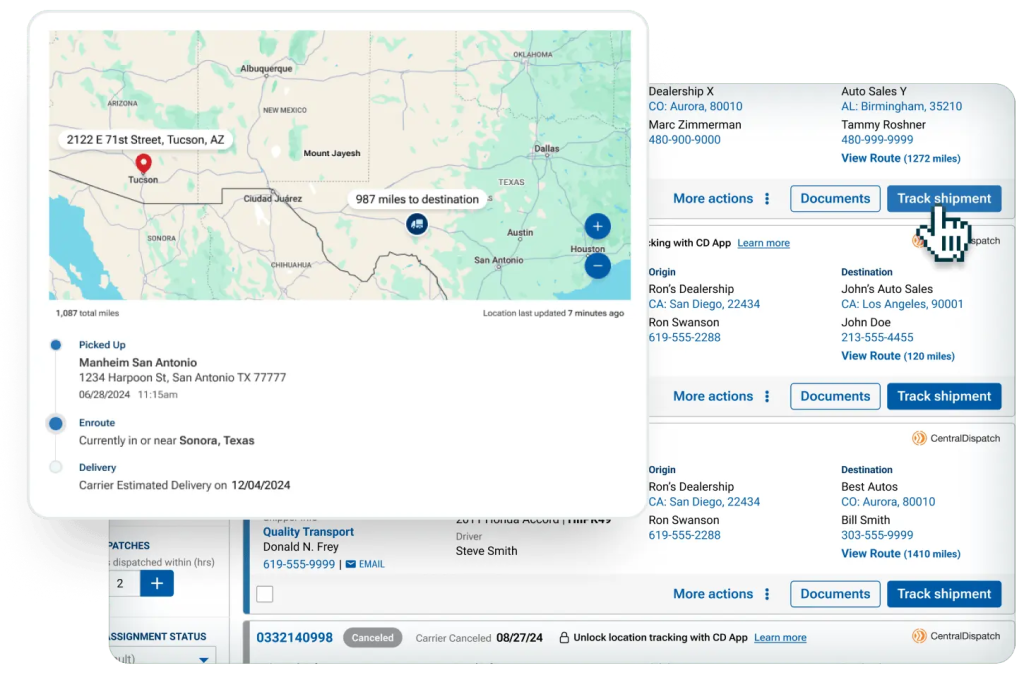
Real-Time Tracking: Shippers are now able to receive live location and status updates delivered straight to their devices, including GPS location, ETA, eBOL information, and more, as long as carriers are using the Central Dispatch app. This allows shippers to easily stay on top of shipments and streamline communication, while saving carriers time by not needing to provide manual status updates. It’s the best way to strengthen relationships between shippers and carriers, and maximize confidence when transporting vehicles.
Price Check and Price Check Plus: Shippers and carriers can utilize insights using Price Check to ensure a fair price for each individual vehicle. For those looking for more robust pricing insights, Price Check Plus uses AI-driven data to predict the optimal price for your load so you can maximize your profitability. Get access to not only listed prices, dates and dispatched information for previous loads, but final pricing and date dispatched details to make more informed decisions, all powered by our Market Intelligence transportation data. Learn more about Price Check and Price Check Plus here.
Central Dispatch Premium: Ship with more power and profit than ever before! Central Dispatch Premium gives you all the same features as a core plan, plus best-in-class transportation tools and unmatched professional support. Maximize vehicles’ profitability with Price Check Plus. Streamline your process with a suite of APIs. Coming soon, dispatch directly to your preferred partners with Preferred Carrier offers. And uncover new opportunities to drive efficiency and profit with Performance Management. Learn more about Central Dispatch Premium and all of our plan options!
And, don’t miss the updates we’re rolling out in 2025:
Enhanced Transactional Ratings: You can now choose when your review is published, giving you the confidence to share your experience. Selecting “Publish Later” means your review will only be publicly posted after your partner has also submitted their rating, or the 14-day review window passes, making it easier to provide honest feedback, and helping foster more transparent partnerships.
Coming soon: Payment Facilitation: Handle all payments and transactions without having to leave the Central Dispatch platform.
Take Control From Listing to Delivery
An overview of how Central Dispatch helps you ship efficiently and profitably at every step of our end-to-end transportation process.

Learn more about the features of Central Dispatch
