

Price Check and Price Check Plus offers carriers and shippers pricing insights for transportation costs to empower decision making and maximize profitability.
Price Check – Generates pricing information based on vehicle and location information
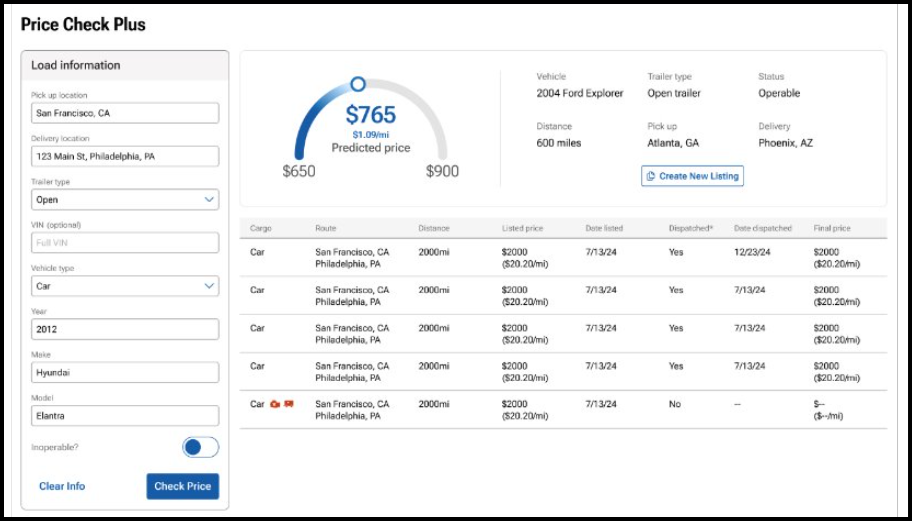
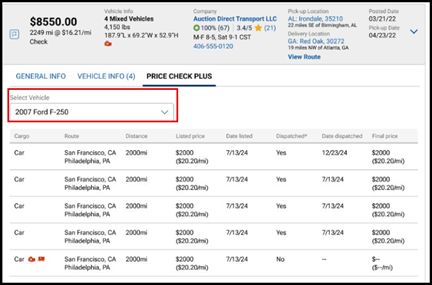
Price Check Plus – Builds on the information offered in Price Check and includes the date and dispatched price as well as a predictive dispatch price within an upper and lower band
All clients can access at any time from the log-in home page by clicking on the Intelligence dropdown
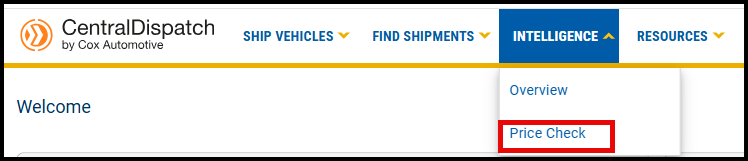
When searching for vehicles on the Search Vehicles page, click on the drop down on the dispatch card and the Price Check

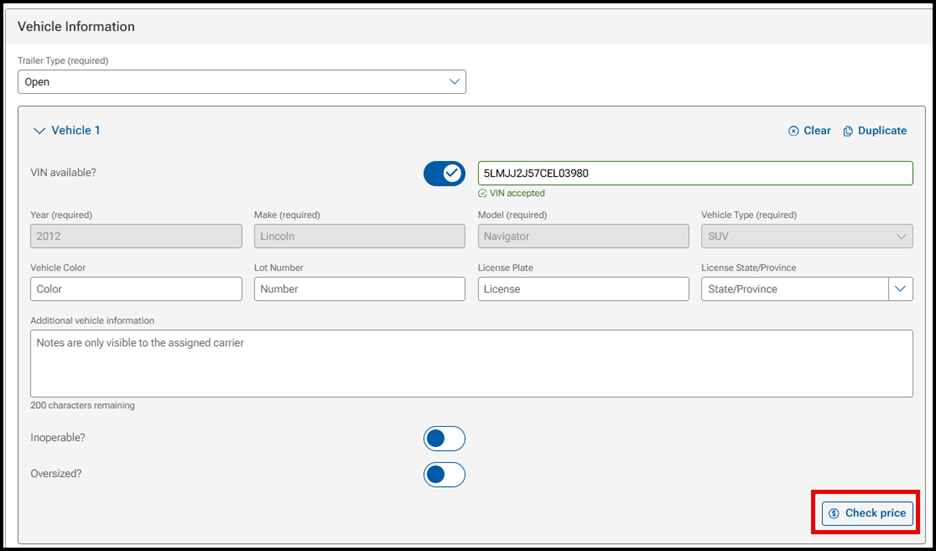
For Shippers on the Create Listing page, click on Check price under the Vehicle Information section
How Price Check and Price Check Plus Work
When accessing Price Check from the drop down on the Intelligence tab:
- Enter load information in the filters on the left side of screen to view pricing information for comparable loads
- For shippers, there will be a link to Create New Listing to easily create a listing from the information populated in the filters
- Note: Users with the Driver role will not have access to Price Check information
- Note: Users with the Driver role will not have access to Price Check information
View of Price Check from the Intelligence tab for an owner role
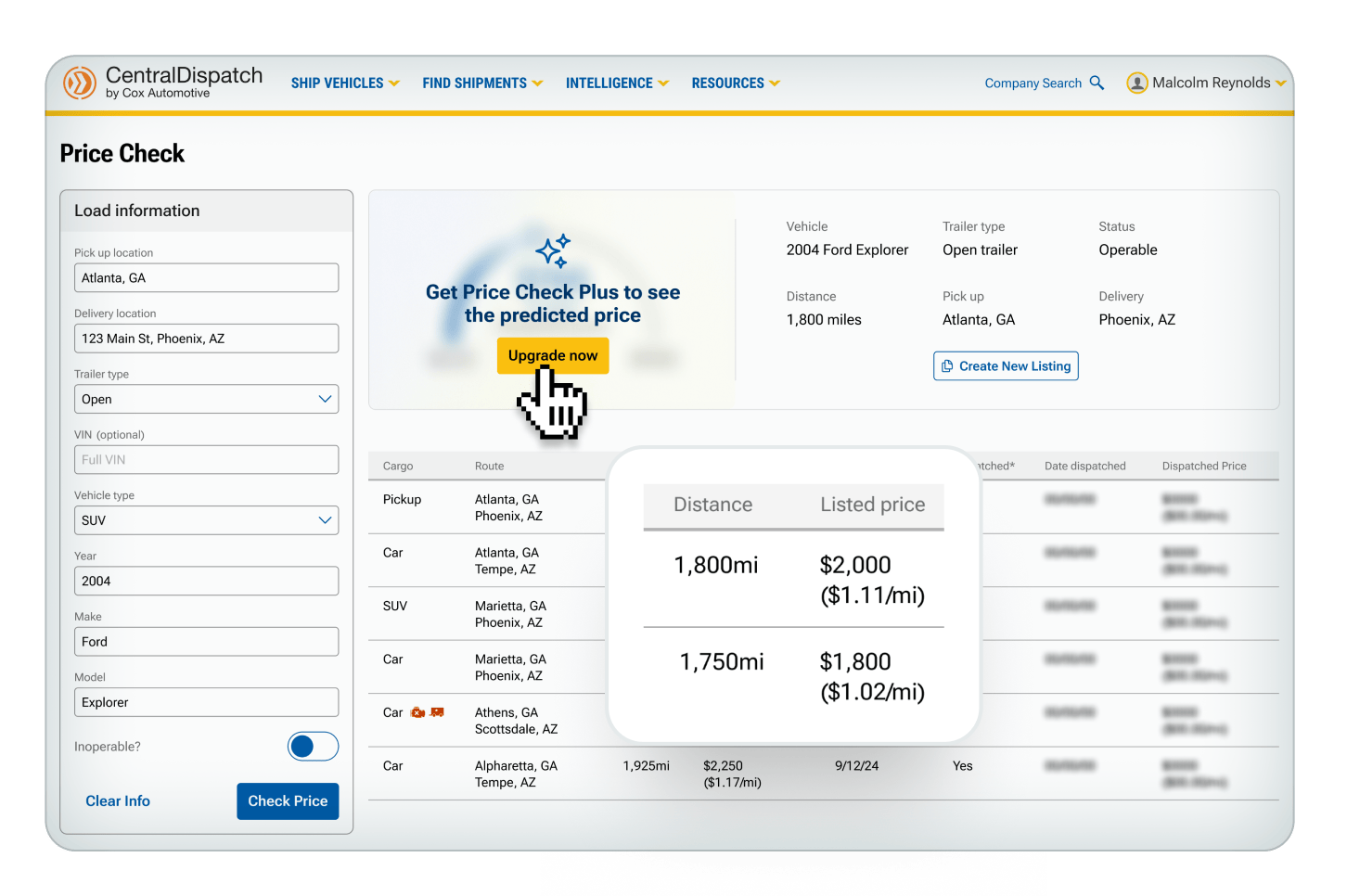
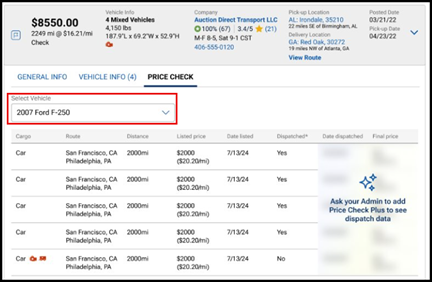
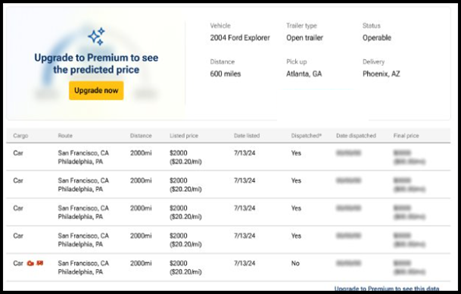
If user is not an owner role, a message will appear to ask admin to sign up

View of Price Check Plus from the Intelligence tab for subscribers
View from Search Vehicles
When displaying Price Check or Price Check Plus for multi-vehicle loads, there is a drop down to select the vehicle in the load to display for both Price Check and Price Check Plus
View from Create Listings
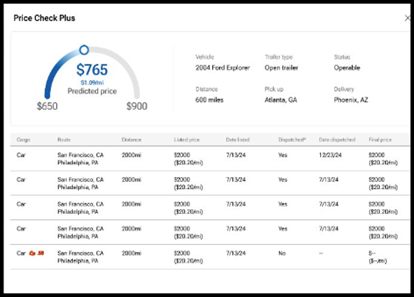
A slide out box will appear when clicking on the Check Price button in Create Listings
Value of Price Check Plus
Price Check Plus is designed to help you maximize profitability and accelerate your speed to transport.
The Predicted Price is one of the most valuable tools available in Price Check Plus and is built on industry-leading AI to provide real-time data reflecting current market trends.
The high and low price represent upper and lower bounds for what would be considered a reasonable price for the listing based on historical trends.

Use the predicted price along with the low range and the high range to make decisions that is best for your company.
- For a shipper: choose a price closer to the upper or lower bands depending on how fast you need the vehicle to move.
- For a carrier: review the price in relation to the upper and lower bands to determine how quickly you may need to act if you are interested in transporting.
The Estimated Time To Dispatch is the estimated time for a listing posted at the predicted price to get dispatched to a carrier.
The time to dispatch is built from the same AI model as the predictive price.
If the shipper needs to it to move it faster, the price can be increased.
- The estimated time to dispatch is not able to predict anything over 36 hours.
Use the Dispatch Date and Dispatched Price on the comparable loads to see if the negotiated rate was different than the listing and see how long it took to get dispatched at the listed rate.
The Transactional Ratings system from Central Dispatch lets you leave in-depth reviews about what it was like to work with a certain shipper or carrier on our platform.
You can rate a business overall and in three distinct categories for each job they perform. You can write reviews describing your experience in more detail, and even reply to comments written about your business.
Today we’ll show you how you can use this new rating system to give helpful, honest feedback, so that you and others can make better partnering decisions and grow your business.
The “Overview” page gives you a general idea of how you’re being rated on Central Dispatch.
You’ll see your company information, your current overall rating (calculated by average), and reviews of your business that have been marked as “most helpful” by other users.
Under “Average Detail Ratings” you’ll see your current rating for each distinct Transactional Ratings category — timeliness, communication, and documentation. Like your overall rating, these are calculated by average. Hover over the “i” for more information on how we define each category.
Scroll through the “Most Helpful Reviews,” to find out which reviews of your business are getting the most hits, and exactly what your partners are saying about you.
View how they’ve rated you in each category, their written review, how many total reviews they’ve left on the site, and how many other users have marked their review as “helpful.”
The Overview page also gives you a quick link to rate your recent transactions (under “Your Connection”) as well as a link to view all of your business’ reviews in more detail, here near the Helpful Reviews.
You can also get there by simply clicking the “All Ratings” tab near the top of the dashboard.
Ratings
On the “All Ratings” page, you’ll first see a visual breakdown of your current overall rating, and a complete list of every review of your business.
You can sort this list by the number of stars attached to each review, to quickly get a clear idea of what people liked about working with you, and what problems may have come up during a job.
You also have the option to reply to any review of your business. Please remember to be fair and courteous when replying to a review. Every reply goes through a 72-hour review period, to make sure our content policy is being followed.
Pending
The “Pending” page is where you’ll rate and review the businesses you’ve worked with in the past 60 days. After 60 days, any pending transaction ratings you have will disappear.
You can rate both completed and canceled transactions that were accepted by a partner. This ensures every partner on our platform is held accountable for their performance for jobs they finished — and for jobs they didn’t.
On the page, you’ll see the company’s name, order ID, and some more specific information about each job. To begin rating a transaction, simply give it an overall rating of 1-5 stars. This will bring up an expanded menu, where you can rate a shipper or carrier on their timeliness, communication, and documentation.
Note that your ratings for each category do not impact the overall rating. Also note that reviews cannot be edited after they’re submitted and star ratings go live on the website the moment you leave them. So it’s very important to understand what to be thinking about for each category before you rate. Let’s go over those in more detail.
For overall rating, youshould think about the general experience working with this person — not just the outcome of the job. Would you feel comfortable doing business with them again? Would you recommend them to others?
Timeliness refers to how closely they met timing expectations outlined in your contract for pickup, delivery, and any other checkpoints. Did they complete delivery or pickup within 72 hours of the estimated time? Were they late? If so, how late?
Your communication rating should consider how professional and responsive a partner was during a job. Did they promptly communicate information like updates, changes, and delays? Did you ever have trouble getting in touch with them?
Documentation includes the completion and accuracy of all job documents, such as eBOL, insurance information, transit forms, and invoices. Was everything filled out correctly? Did paperwork arrive late?
To give even more detailed feedback, leave a short written review describing your experience. What specifically did they do well? What kinds of problems, if any, did you run into?
Leaving a 1-2 star rating for a transaction will prompt you to leave a written review, to encourage responsible use of a negative rating.
You’ll also be prompted to reach out directly to the other party. So if you think any disputes can be solved privately, be sure to take advantage of this feature before posting.
However, it’s important to note that leaving a written review, and rating users in each of the three categories, are both optional. You can always just leave one overall rating if you’d like.
But we highly recommend going the extra mile. It helps everyone identify if a certain carrier or shipper is right for them, and gives other users a more complete picture of your business practices.
Well, that’s all for now. Thanks for taking a few minutes with us to discuss our new transactional ratings system. As always, please reach out to us with any further questions.
The all-new Central Dispatch user management feature lets business owners give employees their own personal Central Dispatch logins.
Account owners will now have more control over how they run their business on Central Dispatch. They’ll decide which employees or contractors can access certain features, decide who gets to view sensitive information, and eliminate the risks of sharing credentials of a single, universal login.
To access the Manage Users page, click your name from any page and select Manage Users from the account dropdown. Only users with the role of Owner, Admin, or Member Manager can access the Manage Users page.
Here, you’ll see your company name in the top left, along with a list of all your organization members who are active Central Dispatch users in the active tab.
You’ll also see their assigned role, contact information, and some actions you can take as the account owner.
Adding new users is easy. Just click the yellow “Add Users” button at the top right of your screen. This will bring up a window where you’ll enter their email and select their role. Read the descriptions to view permissions associated with the role.
Once you have their information entered, hit “Add User,” and an invitation will be sent out to the email address you entered. Members of your team will need to accept the invite before becoming active users.
To view users who you’ve invited that have yet to accept, go to the “Pending” tab. Here you can see the date you sent out the invite, and resend or cancel the invite if necessary.
Remember that the role you assign each team member will impact what they can and can’t do on Central Dispatch.
Drivers and Standard roles can only access and update their own profile, including email address, cell phone number, and username.
While Owners, Admins, and Member Managers are able to add new users and fully manage all other user profiles.
To change a person’s role, click “Edit” here in the Actions column, and select a new role.
To remove a user, simply click the “Remove” button in the Actions column, and click again to confirm the removal in the pop up window.
That’s all for now! We hope you’ll enjoy all the benefits of this new user management feature. As always, please reach out to us with any further questions.
Let’s take a look at what’s new in search. The new search layout allows you to filter and sort live results, all from a single page. We have also reduced the number of clicks. No need to click “search” or “enter” after selecting filters.
Saved searches and filters are found on the listings page. Just click into the saved search to open it. Easily see the saved search you were viewing, along with the number of listings associated with it.
Filters are also available to view for the search. Click the “X” to delete any of the filters, or scroll down the page to any of the filters and then click save. Click the “clear” button to return to a view of all listings.
The browser can be used to manually update listings. Sorting options are at the top of the listings page. And the listing card contains the most important information, including price and price per mile, the vehicle information, company information including ratings, hours of operation and the time zone, and phone number, pickup and delivery information, posted date, and desired pickup date.
And the information is available no matter the size of your screen. Thank you for using Central Dispatch.
Watch Head of Business Lainey Sibble, and Head of Product Eric Schwartz, break down all the enhancements Central Dispatch has implemented this year to create an end-to-end solution that streamlines your core business.
Watch our product leads in this special interview talk about their plans to continuously listen to customer feedback, and develop that feedback into real features that help them solve real challenges.
Watch Head of Business Lainey Sibble explain how Central Dispatch’s new integrations and enhancements help you do all your transportation work more efficiently in one place!
Head of Business, Lainey Sibble and Head of Product, Eric Schwartz, explain all the new features Central Dispatch has rolled out to create a true end-to-end transportation solution that streamline your shipping management.
How our key marketplace enhancements help you ship with even more efficiency
At Central Dispatch, one of our primary goals is to help shippers get their vehicles from point A to point B with maximum efficiency and profitability. That’s why we are aligning with industry standards and updating the way we facilitate vehicles in the platform — counting each vehicle on a per-vehicle basis rather than a per-listing basis.
What does that mean for you? It means each vehicle you post on Central Dispatch will count as one vehicle towards your subscription’s tier limit, even if it’s part of a multi-vehicle listing. It means getting more accurate pricing insights with our Price Check tool, and, coming soon, using the power of AI to list each vehicle at its optimal rate using Price Check Plus. It means managing the logistics of each and every vehicle from listing to delivery, with more precision and efficiency than ever — all with your Central Dispatch plan.
Hear our Head of Business, Lainey Sibble, talk more about how this important update will change the way you price, manage, and ship vehicles for the better in this special video.
